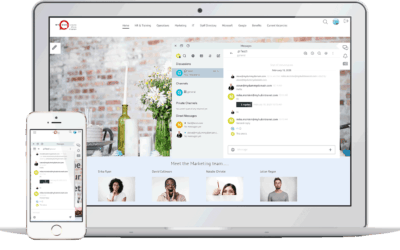
The Intranet Design Guide

Not sure where to get started in designing your intranet?
Check out our easy step-by-step guide below.
Let us guide you through the process.

Intranet Design Made Simple

intranet-design

Deciding to go ahead with an intranet was the easy part, right? After all, whether it’s improved communications, more streamlined processes, or easier access to information, the intranet ticks all the boxes.

However, designing your intranet can be a daunting task.

There are many decisions to be made around the type of intranet, hosting options, organization, structure, plus content, and design. With so much to think about, it can be tough to get started.

And if technology isn’t really your thing, it can be even harder to kick-start your intranet. That’s where this intranet design guide comes into play.

So, if widget, cache, and malware sound like another language, then this guide is for you! Written in simple-to-understand and jargon-free terms, the design guide is non-technical. And where technical language is unavoidable, we clearly define what we mean.

This guide will show you that designing an intranet is a simple task. In fact, it’s so easy, you won’t need IT backup or a college degree in computers!

Click here to download this guide in PDF format

Step-By-Step Intranet Design Support

The guide is a comprehensive resource, covering everything you need to know about intranets. We provide helpful insights at every stage, from different intranet types and hosting options to security and training.

And we also look at all the latest intranet design best practices. This resource includes lots of practical examples and visuals that will excite and inspire you.

Who Should Read This Guide

The design guide is an essential resource for anyone planning to implement a new intranet. It’s also required reading if you are looking to revitalize, revamp, or refresh an existing intranet.

Perhaps you are in the market for an intranet provider to help you realize your vision. The design guide can help you make a winning selection.

Written for the non-technical person, this resource will also support HR or Marketing staff tasked with implementing an intranet.

Why Intranet Design Is So Important

Before we move on, it’s essential to understand why intranet design is so important.

Your intranet’s overall look and feel has the power to grab users’ attention and draw them in. It can spark creativity and foster collaboration. It can connect employees and turn the everyday task into something engaging and fun.

However, the stakes are high. A poorly designed intranet will have the opposite effect. A confusing, overloaded, and ugly intranet will see staff switch off. It’s a wasted opportunity as well as investment.

With so much to lose, getting your intranet design right has to be a priority.


No Two Intranets Are Alike

When it comes to design, there is no one-size-fits-all intranet solution. Sure, there will be similarities. It could be layout, functionality, or scope. However, every organization is different, and so too is their intranet.

Furthermore, staff members will use the intranet differently depending on their job roles and team functions.

Employees use the intranet mainly to source information or collaborate with colleagues. Managers, however, use the intranet to engage workers with targeted communications.

Your intranet design needs to satisfy all the varying needs of employees.

And it also needs to meet the challenges of the modern digital workplace.

The global Covid-19 pandemic has fast-tracked the shift towards remote working. Companies have to pivot and rethink how they engage with their workforce in today’s rapidly changing environment.

And they need to ensure employees have the tools available to remain productive even when working from home.

A mobile intranet is a minimum requirement. In fact, it’s not so much a requirement as an expectation. Whether staff are on the go or working from home, they expect to continue working.

Versatile and flexible, the intranet is capable of meeting these competing demands. And your intranet design should make this vision a reality.

Intranet Templates Make Design Easy

And if you are pushed for time, then intranet design templates could be the perfect solution. This guide takes you through all you need to know.

In short, intranet templates come with in-built coding plus a basic design and graphics. The setup wizard makes it quick and easy to implement your customized intranet. Upload your logo, branding, and corporate colors to really put your company stamp on the intranet. And the good news is the intranet provider has already extensively tested the functionality. And that’s one less major headache for you to worry about.

Therefore, design templates are a popular choice if you need to get your intranet up and running quickly.

Let Us Guide You

Use this guide to make your intranet deployment a smoother and quicker process.

Essential reading for those starting to deploy an intranet, this resource will also help businesses looking to revamp an existing intranet.

Either way, we understand the challenges that are involved. And you get the benefit of our experience as we guide you through the process from beginning to end.

So, let’s get started.

Intranet Design Infographic

If you would like an overview of our intranet design guide, we have created a PDF infographic file summarizing  the main points available here.

Further Reading

This further reading list will be an invaluable resource as it takes you through everything you need to know. We give you the benefit of our considerable experience in developing intranets and provide simple, easy-to-follow explanations, insights and advice.

Use this list to explore the latest intranet design best practice principles. Find out how pre-built intranet templates could well be the solution every time-pressed business owner is looking for. Discover how to ensure your intranet design is mobile friendly and optimized for use on smartphones and tablets. And learn about how to make your intranet interactive and fun so that users readily engage with the platform making for a more efficient and effective workplace.

These are just some of the insights available in this category so why not have a browse or use the search functionality to explore more about intranet design. With our comprehensive knowledge bank, you’ll soon discover that designing an intranet isn’t the mammoth task that perhaps you first thought it was.
Onboarding LMS: Simplify Employee Onboarding with MyHub

Onboarding LMS: Simplify Employee Onboarding with MyHub

Effective onboarding is a pivotal moment for new employees — shaping their experience, productivity and likelihood to stay. The blog argues that traditional onboarding methods (paper forms, disconnected tools, manual check-lists) often fail because they don’t align with how employees actually work. Embedding an onboarding Learning Management System (LMS) inside your intranet fixes this by placing training, resources and workflows where teams already spend time.

With an onboarding LMS built into your intranet, organizations can centralize learning content, automate key tasks (form completions, policy acknowledgements, role-based training), and track progress with real-time reporting. This ensures new hires can find what they need, complete required modules, and engage with the company culture—all without bouncing between systems. The blog highlights key features like personalized learning paths, automated assignments, seamless access to documents and team communication as essential for new-hire success.

The result is two-fold: first, a smoother, faster ramp-up for newcomers (less confusion, better clarity, stronger integration); second, reduced administrative load for HR and team leads (fewer follow-ups, better visibility, stronger metrics). The blog emphasises that onboarding isn’t just a one-time event but the beginning of ongoing development—so choosing the right LMS strategy inside the intranet sets the stage for long-term engagement and growth.

read more
SaaS LMS: Smarter Learning for the Modern Workplace

SaaS LMS: Smarter Learning for the Modern Workplace

A SaaS LMS (Software as a Service Learning Management System) is a cloud-based platform that allows businesses to deliver training, onboarding, compliance programs, and professional development without the complexity of on-premise software. Unlike traditional LMS solutions, SaaS LMS platforms are accessible from any device, provide real-time updates, and scale effortlessly as organizations grow, making them ideal for modern, distributed teams.

Modern companies face challenges with disconnected tools, scattered learning materials, and inconsistent training processes. A SaaS LMS solves these issues by centralizing learning content, policies, and communication in one platform. Employees can access courses anytime, managers can track progress and completion rates, and HR teams gain actionable insights to close skill gaps efficiently—all while reducing administrative workload.

By integrating a SaaS LMS into the company workflow, businesses create a seamless learning experience that supports engagement, productivity, and continuous development. Features like AI-assisted course creation, personalized learning paths, automated reporting, and collaborative tools ensure employees stay motivated and aligned with organizational goals. This approach transforms training from a task into an integral part of everyday work.

read more
Business LMS: Smarter Learning, Seamlessly Built Into Your Intranet

Business LMS: Smarter Learning, Seamlessly Built Into Your Intranet

A Business LMS is a purpose-built platform that centralizes learning within the workflow of employees. Unlike standalone tools, it integrates training, policies, and professional development into the same intranet used for communication, documents, and team collaboration. This approach reduces scattered resources, paper-based workflows, and disconnected teams, making learning easier to access, measure, and apply.

Modern workplaces demand flexible, measurable, and engaging learning experiences, especially in hybrid or remote setups. A Business LMS supports the full employee lifecycle—from onboarding and compliance to leadership development—while providing personalized learning paths, automated reminders, and performance tracking. When embedded in the intranet, learning becomes a seamless part of employees’ daily routines, helping organizations foster continuous growth and skill development.

MyHub’s all-in-one intranet + LMS transforms corporate learning by combining intuitive navigation, AI-assisted course creation, integrated reporting, and workflow tools. Small businesses benefit from simplicity and scalability, while enterprises enjoy powerful features for compliance, engagement, and knowledge management. By connecting learning with communication and collaboration, MyHub builds a culture where development happens naturally, boosting both skills and workplace culture.

read more
How To Create An Intranet: A Step By Step Beginner’s Guide

How To Create An Intranet: A Step By Step Beginner’s Guide

Launching an intranet can feel overwhelming—especially when the options seem technical and the stakes are high. This guide starts by demystifying what an intranet is: a secure internal network where employees collaborate, share resources and communicate effectively. It then explores the main types of intranet solutions—custom-built, off-the-shelf, or cloud-hosted—so organisations can choose an option based on their needs, budget and technical capacity.

The next section drills into the step-by-step process. It begins with assembling the right project team (cross-department representation and leadership support). Then it emphasises defining clear goals and conducting a needs analysis (what problems you want the intranet to solve). Afterwards comes selecting the software solution, designing the site architecture and content strategy, and building the intranet with branding and usability in mind. The guide offers practical design tips like the “six-six rule” (max six pages per section, six items per page) and emphasises mobile-responsiveness and simple navigation.

The final part covers launch and long-term success: pilot testing with a subset of employees, training users and champions, creating buzz around the go-live, and establishing governance, feedback loops and continuous improvement to keep the intranet relevant. The message is clear: the intranet isn’t just a project you check off—it’s a lasting part of your digital workplace that evolves with your business.

read more
The Complete Intranet Design Guide: All You Need To Know

The Complete Intranet Design Guide: All You Need To Know

In this guide, MyHub outlines a structured approach to designing an intranet that truly works for users — not just IT. The process begins with defining the purpose: who the intranet serves, what problems it solves, and how success will be measured. Without this foundation, the design risks being misaligned or under-used.

Next the guide walks through key design components: branding (logo, colours, tone), site architecture (navigation, page hierarchy, discoverability), content strategy (what will live on the intranet, how often it’s updated, who owns it), and user experience (mobile access, intuitive layouts, search). Each step is explained in actionable terms, making the technical feel accessible to non-IT stakeholders.

Finally, the guide emphasises launch and adoption: creating a phased rollout plan, training champions, gathering feedback, measuring usage metrics, and maintaining momentum after go-live. The idea is that a successful intranet isn’t built once and forgotten — it evolves through use, stakeholder input, and continuous improvement.

read more
81 Inspirational Employee Engagement Quotes

81 Inspirational Employee Engagement Quotes

This article presents a collection of 81 carefully selected quotes about employee engagement, drawn from leadership figures, business thinkers, and motivational voices. It begins by explaining that while quotes may seem simple, their power lies in context—used thoughtfully they can underscore culture, values, and recognition within the workplace.

The piece is structured into themed sections — for example: quotes on the importance of engagement, for managers, for retention, and for recognition. Each section offers sample quotes that organisations can embed into intranet pages, newsfeeds, celebration boards or team-chat channels to reinforce engagement. It also includes guidance on how not to over-use quotes: the risk being that too many or inappropriate use can dilute sincerity.

Finally, the article emphasises that quotes are a tool — not a substitute for action. They work best when paired with tangible engagement strategies: clear communication, recognition, purpose-driven work, feedback systems and intranet features that support visibility and belonging. In other words, use the quotes to amplify culture, but keep engagement real.

read more
Best Company Intranet Names: Ideas and Examples

Best Company Intranet Names: Ideas and Examples

Choosing the right name for your intranet is more than just a branding exercise; it’s about creating an identity that resonates with your team and reflects your company’s values. The MyHub article emphasizes the importance of a thoughtful intranet name, explaining that it can inspire, motivate, and engage users, while also conveying your brand’s vision and values. A well-chosen name humanizes the intranet and helps distinguish it from other company systems.

The blog provides a curated list of ten creative intranet names to spark inspiration. These include “Work-e-pedia,” “Exchange,” “The Grid,” “Pulse,” “Elvis,” “The Hub,” “Gateway,” “Insite,” “The Forum,” and “Planet.” Each name is accompanied by a brief explanation of its potential appeal and relevance, offering a diverse range of options to suit various organizational cultures and objectives.

Beyond the list, the article offers practical advice on how to approach the naming process. It suggests considering your intranet’s goals, your company’s culture, and how employees will use the platform. The blog also recommends involving staff in the naming process to foster a sense of ownership and engagement, ensuring the chosen name resonates with the entire organization.

read more
Recruitment Quote: 34 Inspiring Quotes For HR Professionals

Recruitment Quote: 34 Inspiring Quotes For HR Professionals

In recruitment, the right words carry weight—whether you’re attracting talent, inspiring your HR team, or communicating your employer brand. A “recruitment quote” is more than a nice line; it can encapsulate culture, values, and aspirations in a memorable, shareable way.

The blog likely curates a selection of impactful recruitment quotes—perhaps from business leaders, HR experts, or famous thinkers—and ties them back to recruiting challenges like attracting the right candidates, remaining authentic in messaging, overcoming hiring biases, or promoting long-term fit. Each quote is probably framed with context: why it matters, where it can be used (job ads, interview decks, team meetings), and how it can shift mindset.

Beyond the quotes themselves, the article may offer tips on how to use them well: integrate into job postings, internal training, social media, or onboarding materials; avoid clichés; match quotes to your brand voice; and rotate them to keep them fresh. Quotes work best when they resonate authentically and reinforce your unique recruitment values.

read more
Thank You Notes For Coworkers: 50 Heartfelt Messages For Work Colleagues

Thank You Notes For Coworkers: 50 Heartfelt Messages For Work Colleagues

A well-timed thank-you note can light up a colleague’s day—and strengthen workplace relationships in meaningful ways. The article begins by exploring why even small expressions of gratitude matter: they foster camaraderie, improve morale, and support a culture of appreciation. Though moments can slip by, having a bank of ideas on hand makes recognition easier to act on.

To help, MyHub curated 50 thank-you messages that span various scenarios—general gratitude, departing colleagues, covering for absence, bosses, humorously light notes, and more. The messages are adaptable across email, cards, chat apps, or intranet shout-outs, and are organized by the context in which you want to thank someone.

Beyond the list, the article emphasizes the broader impact of appreciation on organizational performance. It cites research showing that companies with strong cultures of recognition experience higher growth, and further argues that appreciation isn’t just a perk—it’s a strategic advantage.

read more
Off The Shelf Intranet: Pre-Built and Fully Developed

Off The Shelf Intranet: Pre-Built and Fully Developed

An off-the-shelf intranet refers to a pre-built intranet platform that comes with ready-to-use modules, templates, and features out of the box. These systems allow organizations to get started quickly without needing to build from scratch or invest heavily in custom development. The focus is on speed, ease of setup, and standard features that cover most common intranet use cases: document sharing, news feeds, staff directories, communication tools, etc.

While these solutions lack some of the deep customization of bespoke systems, they offer many advantages: faster time to go-live, lower upfront cost, predictable maintenance and support, frequent updates by vendor, and lower requirement for internal technical skills. They are especially useful for small-to-medium enterprises, or organizations that need a solid intranet quickly, without reinventing the wheel.

To make the most of an off-the-shelf intranet, organizations should choose a vendor that provides strong template options, flexible branding, modular features, good vendor support, and integrations with existing tools (e.g. MS-365, Google Workspace). It’s also wise to plan for user adoption, feedback, and ongoing content governance to ensure the intranet stays relevant and gets used.

read more
CMS Intranet Software: Unleash The Power

CMS Intranet Software: Unleash The Power

In today’s fast-paced business environment, effective internal communication and collaboration are paramount. MyHub’s CMS intranet software offers a comprehensive solution to streamline these processes. By providing a centralized platform for content management, employees can easily create, edit, and share information without the need for extensive technical knowledge. This user-friendly approach ensures that all team members, regardless of their technical expertise, can contribute to and benefit from the intranet’s resources.

The software’s versatility extends beyond content creation. It integrates various tools that facilitate seamless collaboration among team members. Features such as instant messaging, shared calendars, and document sharing enable employees to work together efficiently, regardless of their physical location. This is particularly beneficial for organizations with remote or hybrid work models, as it ensures that all team members remain connected and engaged.

Furthermore, MyHub’s CMS intranet software is designed with scalability in mind. As organizations grow and evolve, the software can be customized to meet changing needs. Whether it’s adding new modules, integrating with other systems, or adjusting user permissions, the platform offers the flexibility required to adapt to an organization’s unique requirements. This scalability ensures that the intranet remains a valuable asset as the organization progresses.

read more
How To Handle Employees With Bad Attitudes: 5 Practical Tips For Managers

How To Handle Employees With Bad Attitudes: 5 Practical Tips For Managers

Employees with bad attitudes can quietly undermine team morale and productivity, even if they perform their job tasks. These individuals often complain constantly, gossip, shift blame, or subtly resist leadership—behaviors that can poison the work environment if left unchecked. Recognizing the difference between someone occasionally voicing feedback versus someone chronically toxic is vital for managers.

To handle such situations, the article presents five practical strategies. First, document specific instances of negative behavior—unhelpful comments in meetings, undermining coworkers, or undermining authority—so discussions are grounded in fact. Next, have a private meeting (ideally with HR present) where you explain the concern, listen to their perspective, and frame expectations moving forward. From there, co-create an action plan with behavioral benchmarks and follow-up sessions. If the employee fails to change, formal warnings or termination may be necessary.

Beyond direct interventions, the article argues that a positive corporate culture helps deter negative attitudes from arising in the first place. Encouraging two-way communication, recognizing contributions, fostering belonging, caring for employee wellbeing, and celebrating collective wins all help build a resilient, engaged team. The message is clear: dealing with attitude issues early, fairly, and systematically protects team health and long-term performance.

read more
Corporate Communication: What SMEs Need To Know

Corporate Communication: What SMEs Need To Know

Effective corporate communication is crucial for SMEs aiming to build strong relationships with both internal and external stakeholders. The article emphasizes that clear and consistent messaging fosters trust, aligns team objectives, and enhances brand reputation. By understanding the nuances of corporate communication, SMEs can navigate challenges and seize opportunities for growth.

The piece delves into the two primary categories of corporate communication: internal and external. Internal communication encompasses interactions within the organization, such as between management and employees or among departments. Tools like intranets, team chats, and internal newsletters can facilitate this. External communication, on the other hand, involves engaging with customers, media, and the public, often through marketing materials, press releases, and social media channels.

To assist SMEs in refining their communication strategies, the article provides practical examples and best practices. It highlights the importance of tailoring messages to the audience, choosing the appropriate communication channels, and maintaining consistency across all platforms. By adopting these practices, SMEs can enhance their corporate communication efforts and achieve greater success in their endeavors.

read more
Overcoming Communication Barriers: Key Skills and Practical Examples

Overcoming Communication Barriers: Key Skills and Practical Examples

Effective communication is vital for success in any organization. However, various barriers can impede the flow of information, leading to misunderstandings and decreased productivity. These barriers can be physical, such as noise or distance; cultural, like language differences or varying communication styles; or emotional, including fear or lack of trust. Recognizing these obstacles is the first step toward fostering a more communicative and cohesive work environment.

The article delves into specific barriers that organizations often face. For instance, physical barriers may include open office layouts that cause distractions or technological issues that hinder virtual communication. Cultural barriers might involve misinterpretations due to different cultural norms or language proficiency levels. Emotional barriers often stem from unresolved conflicts or lack of psychological safety, which can prevent individuals from expressing themselves openly.

To overcome these challenges, the article suggests several strategies. These include establishing clear communication protocols, promoting cultural awareness and sensitivity, providing training to improve communication skills, and creating an environment where feedback is encouraged and valued. By addressing these barriers proactively, organizations can enhance collaboration, reduce misunderstandings, and improve overall efficiency.

read more
Simplify Project Tracking With 10 Tools That Keep Your Team Aligned

Simplify Project Tracking With 10 Tools That Keep Your Team Aligned

Project tracking is the practice of systematically monitoring the progress of tasks and deliverables against an established plan. By collecting real-time data and comparing it to expectations, project managers can spot delays or resource misalignments early—and take corrective action. This kind of visibility helps keep initiatives on schedule and in scope.

The article emphasizes how lacking clarity or slow internal communications are major contributors to project failures—citing that 39% of projects fail due to ambiguous objectives, and 33% cite communication issues. To tackle such challenges, the post recommends selecting project-tracking tools that centralize task lists, timelines, dependencies, and status updates in one place.

To help readers choose wisely, the article presents 10 tools that can support project tracking and team alignment. It also discusses how intranet-based tracking tools (like MyHub’s modules) can make collaboration smoother by embedding tracking within your internal network—reducing context-switching and improving adoption.

read more

Ready To Get Started?