
Digital Workplace
Enable remote working for staff and let technology, people and processes unite
Share. Engage. Connect

Today’s always-connected, instant-access working environment has questioned the need for office-based working. Like never before, staff are connecting and collaborating with their peers in real-time, from any location.
As more staff transition to a work-from-home scenario, digital workplace technology offers a vital agile setting for businesses. Digital workplace technology can improve productivity, creative thinking, and team collaboration.
While some organizations have already embraced a digital workplace culture, others are being forced unexpectedly into managing staff remotely. The silver lining for the latter cohort is that if done right, remote working can facilitate a smarter, faster, better operation. Businesses stand to benefit from increased employee engagement and all-round improved business performance.
What is the Digital Workplace?

One of the most accepted definitions of the digital workplace is “the alignment of technology, employees and business processes to improve operational efficiency and meet organizational goals”.
Gartner describes it as a way of enabling new, more effective ways of working; raising employee engagement and agility; and exploiting consumer-oriented styles and technologies.
It’s been dubbed as the fourth industrial revolution, the digital transformation.
New digital workplace practices are being embedded into everyday life, across every size and type of business. Artificial intelligence, automation, and machine learning technology are taking over manufacturing, service work, and many other essential business tasks. And while most companies acknowledge the benefits of digital working, many admit to lacking the technical knowledge to lead the way (source: McKinsey & Company).
Distributed Working: The New Normal

The way in which we spark ideas and get work done has changed forever. With more employers supporting the distributed workforce model – either through choice or an unexpected crisis – the practical side of completing tasks and communicating with colleagues now, more-often-than-not, takes place in a digital space. Indeed, many economists forecast the physical office will soon be a thing of the past, accelerated by the recent Covid-19 pandemic.
A distributed workforce – also known as remote workers, digital nomads, telecommuters or home office workers – work from any location, across multiple devices. They value work/life balance, flexible hours – and critically, the need to feel connected. Digital workplace technology provides this essential connection – emphasizing the importance of friction-free, easy-to-use software.
If the physical office is no longer a place we go to work, these digital touchpoints play a vital role in how employees stay motivated, informed and engaged in what they do.
The onus will be on the employer to optimize the digital workplace experience for employees. Security, fast access, as well as intuitive and compatible software are just some of the important considerations when transitioning into a digital world.
Key Benefits Of A Digital Workplace Strategy
The advantages of adopting a digital workplace strategy spread wider than most businesses originally anticipate. Here are some of the expected and unexpected benefits:
Team Collaboration
Improved levels of problem-solving, interaction and knowledge-sharing – all-round improved collaboration
Flexible Remote Working
Allows employees to work from home, supporting more flexible working
Productivity Boost
Increased efficiency and employee productivity through improved communications
Innovation
Great ideas can come from anywhere – not just the boardroom – if staff have the right channels
Change Management
Clear, reliable communications minimizes confusion and garners internal support
Improved Transparency
Improved traceability and transparency amongst teams, reducing errors
Hidden Savings
Decreased employee commuting expenses and business real estate cost
Employee Experience
Improved personal experiences through greater inclusivity and integration of tasks
Retain Talent
Lower employer turnover rates due to improved work/life balance and engagement
The Digital Workplace Framework
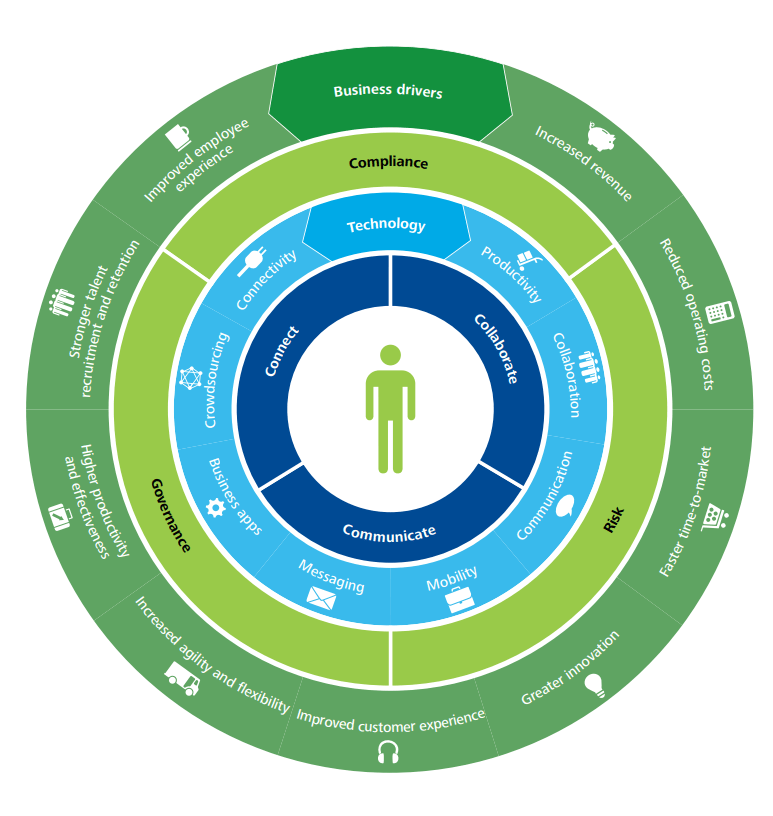
Deloitte has developed a four-layer framework to help govern the design of a digital workplace. This is a useful guide for those businesses looking for workplace transformation. This framework comprises of:
1) Use – for staff to collaborate, communicate and connect
2) Technology – the digital tools to enable staff to do their job
3) Control – having the right governance structure and compliance controls in place to reduce risk
4) Business drivers – measuring the outcomes and actual business value.
It explains how to leverage your investment to support a new and better way of doing business that will enhance both the employee experience and the customer experience.
Tips For Deploying A Digital Workplace
Here are some practical tips to help you blend your existing applications with new technology to create the ultimate user experience and a high-performing work environment.
1. Involve the right people to steer the project. Senior ownership is vital, but including representatives who will drive the technology is also key.
2. Ensure alignment with business strategy. Keep your big picture always in mind i.e. ‘will this new tool and process-change enable us to achieve our goals?’
3. Consider internal culture. How amenable will staff be to new technology and digital experiences? Develop an internal communications program to explain the benefits of digital technology and how vital it is in today’s workplace. And most of all, make it easy for staff to do their job.
4. Deliver business value. Avoid falling for the ‘shiny new thing’. Stay true to the original outcomes your business needs.
5. Research technologies. A good case study, a free trial, a call with a current user – these are all helpful ways to shortlist new technologies. There are multiple service providers playing in a very dynamic, competitive digital market.
6. Consider risk, compliance and legal consequences. There are important regulations surrounding data management and security that must be adhered.
Digital Workplace: Future Trends
What are the anticipated trends at play when today’s graduates become tomorrow’s C-suite, artificial intelligence is mainstream, and the traditional office is no more?
Here’s our view of the future and the role of the digital workplace:
Cloud-based Solutions
Effective, cloud services with unlimited access will be essential to support remote working
No Standing Still
Technology will continue to evolve, either organically or intentionally. Status quo is not an option
All-On Automation
Traditional ways of working will continue to be disrupted; automated processes will increase
Tech Choice Matters
Technology stack choices will become more important when attracting staff and tech compatibility
Staff Expectations
Young workers have a huge appetite for social tools and tech, increasing pressure for employers to invest
Customer Self-Service
Customers will want to search and solve their own questions independently, without speaking with an agent
Overwhelming Options
Choice-explosion of SaaS products could be overwhelming; apps may fail to work together
Employee Experience
Employers will try harder to motivate, engage, inspire and involve staff to retain talent
Tech Maze
Employees become ‘trapped in the tech maze’ with many apps overlapping and staff feeling bamboozled
❝
The Digital Workplace is a work in progress, an ongoing journey, with only 14% of companies believing they are at a ‘mature phase’.
Source: Digital Workplace Group
Digital Workplace Software
Core to the successful adoption of a digital attitude is finding ways to support staff as they navigate through the tech maze of the modern digital workplace, along with adjusting to working from home. While there are countless business apps and platforms suited to their specific areas of business, a central hub – or gateway if you like – where staff can access everything they need to complete their job is vital.
MyHub intranet software provides that central digital space for staff to communicate, share and source company information, regardless of their location. Our cloud-hosted, single access point makes life easier for staff, helping them do their job better.
From instant messaging to the seamless integration of business applications, workflow automation to access-controlled content libraries, MyHub brings together all this into a beautifully-sleek, easy-to-navigate digital workplace. All accessible with a single sign-on.
Digital Workplace Tools: The MyHub Difference
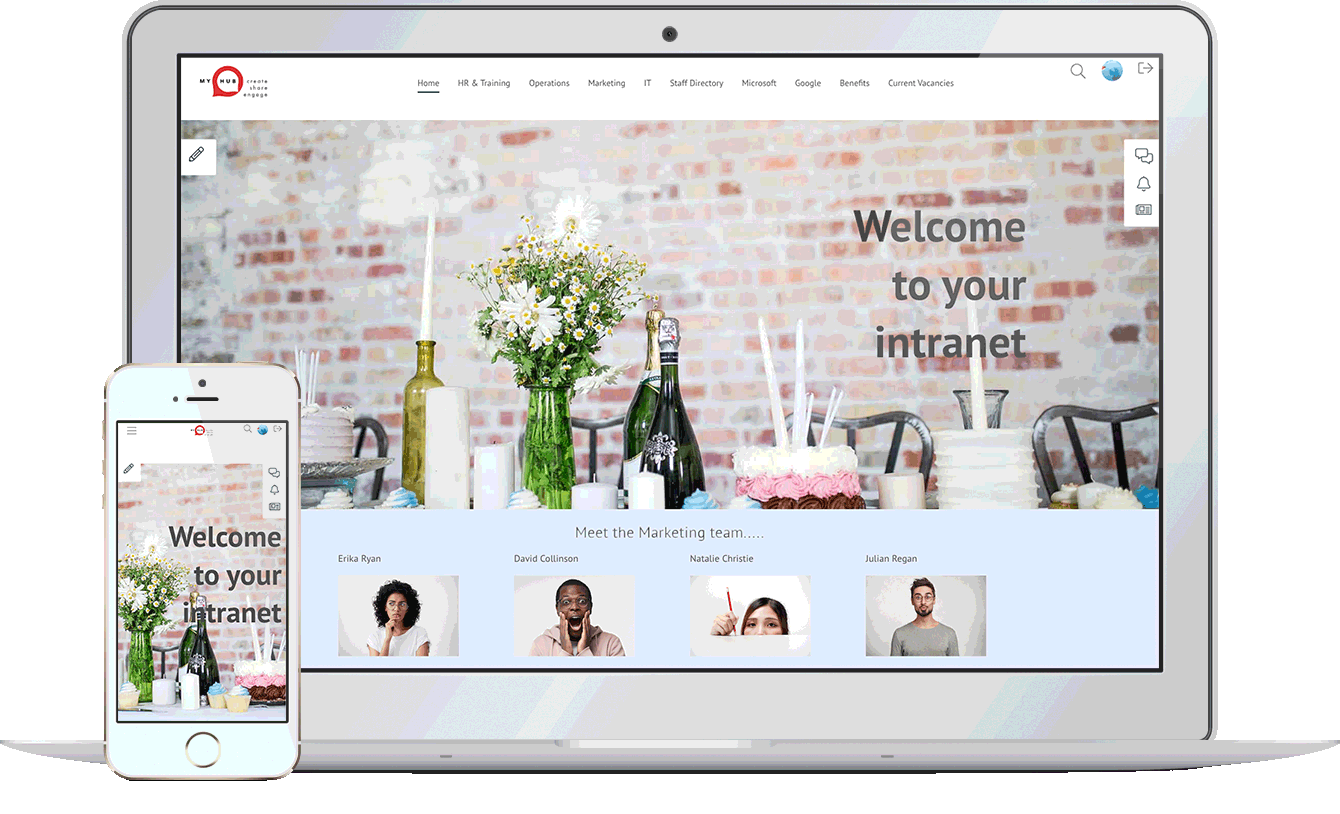
Considered the central hub of your digital workplace solution, MyHub is fully scalable, designed to support your company’s growth. And fully customizable, to meet your exact needs.
Designed with the non-technical buyer in mind, MyHub requires no coding skills or IT experience. It is simple to set-up – and fun to use!
Using simple drag-and-drop functionality, you can create a professional digital workspace in minutes! Being cloud-hosted also means you’re future-proofing your investment: you get to benefit from our latest new features and enhancements as soon as they’re released.
Let our technology unleash a smarter and super-efficient digital workplace solution that your staff will love.
❝
Managers have reduced the time spent on management activities by one to three hours due to system integration and collaboration tools
Useful Digital Workplace Resources
Intranet Portal Software: 8 Key Features Explained
Last updated: August 18, 2026 The 8 Key Features Of Intranet Portal Software Intranet portal software gives employees one secure, private place to find company news, documents, tools, and each other. Think of it as your organization's single front door: one URL, one...

Franchise Intranet: 5 Things a Standard Intranet Can’t Do
Last updated: August 5, 2026 A franchise intranet is a private, secure digital hub accessible only to franchisees and head office staff that centralizes the resources, tools, and communications a distributed franchise network needs to operate consistently across every...

7 Jotform Alternatives To Consider
Jotform has long been a go‑to online form builder for many businesses, offering a drag-and-drop interface, conditional logic, e-signatures, and thousands of templates. However, common complaints include slow loading times, an outdated editor, and overwhelming template choices—pushing many organizations to explore alternatives.
To help decision-makers, MyHub lists seven compelling Jotform alternatives: forms.app, Zoho Forms, Google Forms, Microsoft Forms, ProProfs Survey Maker, SurveyMonkey, and its own intranet-powered form builder. Each option varies in ease-of-use, feature set, pricing, analytics, and integrations, making it easier to align tool choice with organizational needs and budgets.
MyHub’s form builder stands out by combining intuitive drag-and-drop form design with workflow automation—notifications, approval routing, conditional fields, and role-based permissions—all included at no extra cost within its intranet platform. With built-in integrations to Microsoft 365 and Google Workspace, mobile accessibility, and support tools, it offers a more holistic form solution suited for internal processes.

Work From Home Policy – With PDF Sample Template
The widespread shift to home-based work during the pandemic has led organizations to recognize remote and hybrid work as permanent fixtures in modern working life. A formal work-from-home policy is now a necessity—not a luxury—enabling clarity between employer and employee on expectations, rights, and performance standards.
This article outlines the six critical steps in crafting an effective policy: define clear objectives and scope (such as fully remote vs hybrid use), establish eligibility criteria, set communication and work-hour expectations, and specify technical support, equipment provisions, and expense arrangements. It also includes vital sections on cybersecurity protocols, approvals process, and social support to address remote isolation.
By implementing a structured WFH policy, companies can safeguard sensitive data, boost productivity, reduce overhead, and improve employee well-being. Remote workers benefit from greater clarity on equipment allowances, tech support, and workspace setup guidance, while employers protect their interests and strengthen recruitment and retention in an increasingly flexible work landscape.
Extranet vs. Intranet vs. Internet: The Ultimate Explanation
The Internet is an open, global network accessible to anyone, offering unlimited reach but minimal control—making it insecure for sensitive business operations. By contrast, an intranet is a private, internal network owned and managed by a company. Protected with firewalls and login credentials, it offers employees a secure place to communicate, collaborate, and share documents.
An extranet builds on the intranet by granting controlled access to external stakeholders—such as suppliers, partners, or franchisees—enabling collaboration without exposing the entire internal network. It balances openness with privacy, allowing secure sharing of relevant information beyond company walls.
While all three network types use standard web technologies (e.g. HTTP, IP protocols), their main distinctions lie in ownership, user access, and security. The Internet is unregulated and public, the intranet is internal and regulated, and the extranet is a selectively shared private network—each chosen based on organizational collaboration needs and security requirements.

How To Guides – Ideas, Examples, Step by Step
How-to guides are everywhere—and for good reason. They’re simple, step-by-step instructions that help people learn a task or process—whether it’s creating a company onboarding plan or cooking dinner. The best guides are clear, focused, and tailored to their audience, offering actionable steps that actually get results.
These guides serve many purposes: they offer self-service support for customers and employees, boost satisfaction, and reduce repetitive inquiries. Internally, they help onboard new staff, preserve institutional knowledge, and minimize mistakes—especially on common tasks or workflows.
To craft a great how-to guide, start by understanding your audience and researching the task. Then break the process into clear steps using simple, jargon-free language and logical order. Enhance clarity with visuals like images or examples. Finally, wrap up with resource links and a FAQ section for further support.