
Digital Workplace
Enable remote working for staff and let technology, people and processes unite
Share. Engage. Connect

Today’s always-connected, instant-access working environment has questioned the need for office-based working. Like never before, staff are connecting and collaborating with their peers in real-time, from any location.
As more staff transition to a work-from-home scenario, digital workplace technology offers a vital agile setting for businesses. Digital workplace technology can improve productivity, creative thinking, and team collaboration.
While some organizations have already embraced a digital workplace culture, others are being forced unexpectedly into managing staff remotely. The silver lining for the latter cohort is that if done right, remote working can facilitate a smarter, faster, better operation. Businesses stand to benefit from increased employee engagement and all-round improved business performance.
What is the Digital Workplace?

One of the most accepted definitions of the digital workplace is “the alignment of technology, employees and business processes to improve operational efficiency and meet organizational goals”.
Gartner describes it as a way of enabling new, more effective ways of working; raising employee engagement and agility; and exploiting consumer-oriented styles and technologies.
It’s been dubbed as the fourth industrial revolution, the digital transformation.
New digital workplace practices are being embedded into everyday life, across every size and type of business. Artificial intelligence, automation, and machine learning technology are taking over manufacturing, service work, and many other essential business tasks. And while most companies acknowledge the benefits of digital working, many admit to lacking the technical knowledge to lead the way (source: McKinsey & Company).
Distributed Working: The New Normal

The way in which we spark ideas and get work done has changed forever. With more employers supporting the distributed workforce model – either through choice or an unexpected crisis – the practical side of completing tasks and communicating with colleagues now, more-often-than-not, takes place in a digital space. Indeed, many economists forecast the physical office will soon be a thing of the past, accelerated by the recent Covid-19 pandemic.
A distributed workforce – also known as remote workers, digital nomads, telecommuters or home office workers – work from any location, across multiple devices. They value work/life balance, flexible hours – and critically, the need to feel connected. Digital workplace technology provides this essential connection – emphasizing the importance of friction-free, easy-to-use software.
If the physical office is no longer a place we go to work, these digital touchpoints play a vital role in how employees stay motivated, informed and engaged in what they do.
The onus will be on the employer to optimize the digital workplace experience for employees. Security, fast access, as well as intuitive and compatible software are just some of the important considerations when transitioning into a digital world.
Key Benefits Of A Digital Workplace Strategy
The advantages of adopting a digital workplace strategy spread wider than most businesses originally anticipate. Here are some of the expected and unexpected benefits:
Team Collaboration
Improved levels of problem-solving, interaction and knowledge-sharing – all-round improved collaboration
Flexible Remote Working
Allows employees to work from home, supporting more flexible working
Productivity Boost
Increased efficiency and employee productivity through improved communications
Innovation
Great ideas can come from anywhere – not just the boardroom – if staff have the right channels
Change Management
Clear, reliable communications minimizes confusion and garners internal support
Improved Transparency
Improved traceability and transparency amongst teams, reducing errors
Hidden Savings
Decreased employee commuting expenses and business real estate cost
Employee Experience
Improved personal experiences through greater inclusivity and integration of tasks
Retain Talent
Lower employer turnover rates due to improved work/life balance and engagement
The Digital Workplace Framework
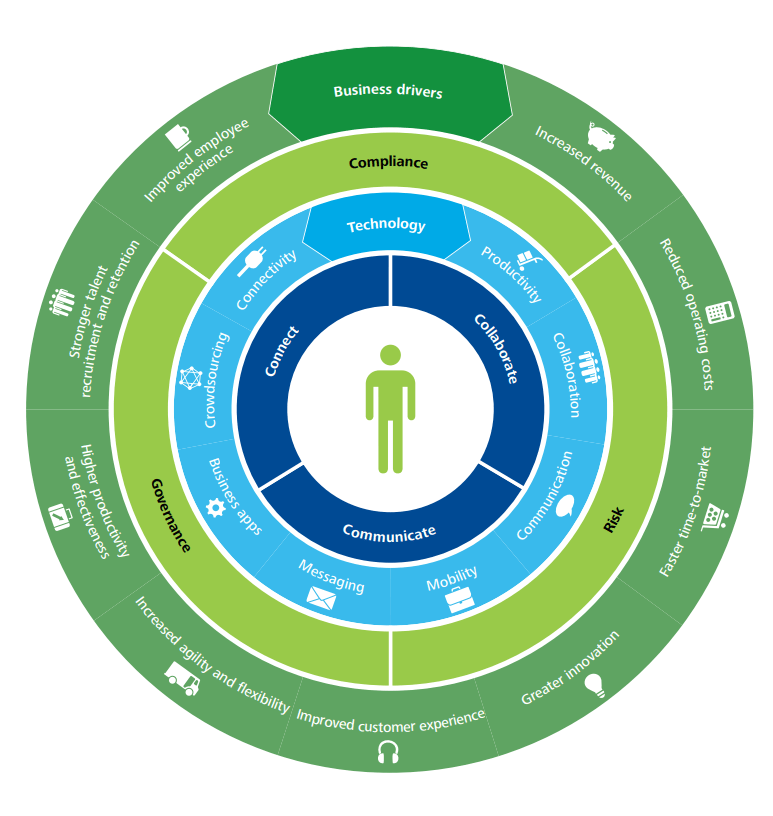
Deloitte has developed a four-layer framework to help govern the design of a digital workplace. This is a useful guide for those businesses looking for workplace transformation. This framework comprises of:
1) Use – for staff to collaborate, communicate and connect
2) Technology – the digital tools to enable staff to do their job
3) Control – having the right governance structure and compliance controls in place to reduce risk
4) Business drivers – measuring the outcomes and actual business value.
It explains how to leverage your investment to support a new and better way of doing business that will enhance both the employee experience and the customer experience.
Tips For Deploying A Digital Workplace
Here are some practical tips to help you blend your existing applications with new technology to create the ultimate user experience and a high-performing work environment.
1. Involve the right people to steer the project. Senior ownership is vital, but including representatives who will drive the technology is also key.
2. Ensure alignment with business strategy. Keep your big picture always in mind i.e. ‘will this new tool and process-change enable us to achieve our goals?’
3. Consider internal culture. How amenable will staff be to new technology and digital experiences? Develop an internal communications program to explain the benefits of digital technology and how vital it is in today’s workplace. And most of all, make it easy for staff to do their job.
4. Deliver business value. Avoid falling for the ‘shiny new thing’. Stay true to the original outcomes your business needs.
5. Research technologies. A good case study, a free trial, a call with a current user – these are all helpful ways to shortlist new technologies. There are multiple service providers playing in a very dynamic, competitive digital market.
6. Consider risk, compliance and legal consequences. There are important regulations surrounding data management and security that must be adhered.
Digital Workplace: Future Trends
What are the anticipated trends at play when today’s graduates become tomorrow’s C-suite, artificial intelligence is mainstream, and the traditional office is no more?
Here’s our view of the future and the role of the digital workplace:
Cloud-based Solutions
Effective, cloud services with unlimited access will be essential to support remote working
No Standing Still
Technology will continue to evolve, either organically or intentionally. Status quo is not an option
All-On Automation
Traditional ways of working will continue to be disrupted; automated processes will increase
Tech Choice Matters
Technology stack choices will become more important when attracting staff and tech compatibility
Staff Expectations
Young workers have a huge appetite for social tools and tech, increasing pressure for employers to invest
Customer Self-Service
Customers will want to search and solve their own questions independently, without speaking with an agent
Overwhelming Options
Choice-explosion of SaaS products could be overwhelming; apps may fail to work together
Employee Experience
Employers will try harder to motivate, engage, inspire and involve staff to retain talent
Tech Maze
Employees become ‘trapped in the tech maze’ with many apps overlapping and staff feeling bamboozled
❝
The Digital Workplace is a work in progress, an ongoing journey, with only 14% of companies believing they are at a ‘mature phase’.
Source: Digital Workplace Group
Digital Workplace Software
Core to the successful adoption of a digital attitude is finding ways to support staff as they navigate through the tech maze of the modern digital workplace, along with adjusting to working from home. While there are countless business apps and platforms suited to their specific areas of business, a central hub – or gateway if you like – where staff can access everything they need to complete their job is vital.
MyHub intranet software provides that central digital space for staff to communicate, share and source company information, regardless of their location. Our cloud-hosted, single access point makes life easier for staff, helping them do their job better.
From instant messaging to the seamless integration of business applications, workflow automation to access-controlled content libraries, MyHub brings together all this into a beautifully-sleek, easy-to-navigate digital workplace. All accessible with a single sign-on.
Digital Workplace Tools: The MyHub Difference
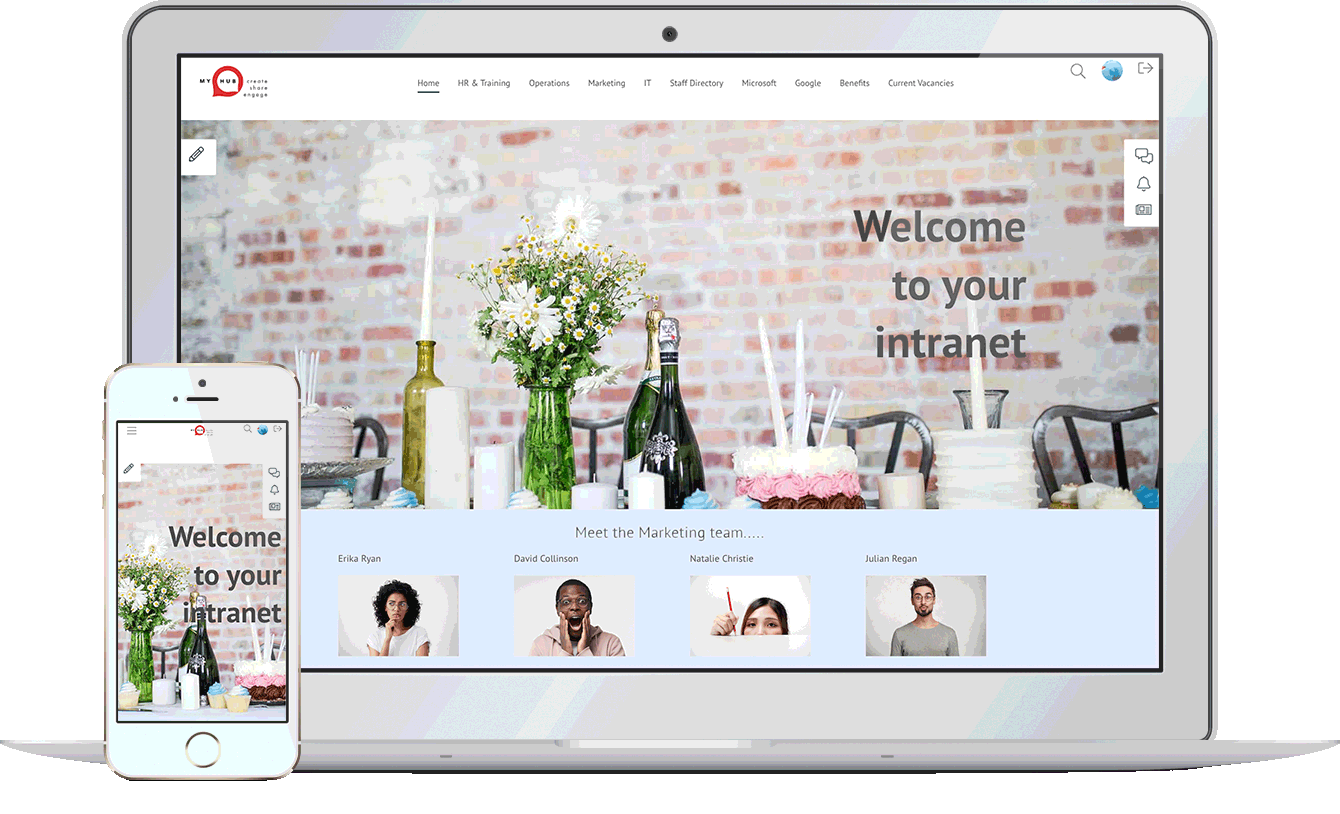
Considered the central hub of your digital workplace solution, MyHub is fully scalable, designed to support your company’s growth. And fully customizable, to meet your exact needs.
Designed with the non-technical buyer in mind, MyHub requires no coding skills or IT experience. It is simple to set-up – and fun to use!
Using simple drag-and-drop functionality, you can create a professional digital workspace in minutes! Being cloud-hosted also means you’re future-proofing your investment: you get to benefit from our latest new features and enhancements as soon as they’re released.
Let our technology unleash a smarter and super-efficient digital workplace solution that your staff will love.
❝
Managers have reduced the time spent on management activities by one to three hours due to system integration and collaboration tools
Useful Digital Workplace Resources

Is An Enterprise Social Network Right For Your Business?
In today’s hybrid work environments, traditional communication methods often fall short in fostering effective collaboration. Enterprise Social Networks (ESNs) offer a solution by providing a secure, internal platform for employees to connect, share information, and collaborate in real-time. These platforms combine elements from popular social media sites, such as messaging, content sharing, and community building, tailored specifically for organizational use.
The blog post delves into the advantages of adopting an ESN, including improved internal communication, enhanced knowledge sharing, and the ability to break down departmental silos. By centralizing communication and collaboration tools, ESNs enable employees to access information and engage with colleagues more efficiently, regardless of their location. This leads to faster decision-making, increased productivity, and a more cohesive organizational culture.
However, the implementation of an ESN is not without challenges. The article also addresses potential drawbacks, such as the risk of information overload, the need for proper training, and the importance of establishing clear guidelines to ensure the platform is used effectively. By weighing these factors, organizations can make informed decisions about whether an ESN aligns with their communication and collaboration needs.

100 Smart Performance Review Questions To Ask
Performance reviews are more than just formal check-ins — they’re pivotal moments to inspire growth, provide direction, and foster stronger employee-manager relationships. When done right, appraisals improve morale, engagement, and performance. But a successful review starts with asking the right questions. This blog post offers 100 smart, well-structured performance review questions tailored for both managers and employees.
The questions are grouped into meaningful categories like strengths, areas for improvement, teamwork, motivation, and professional development. Managers can use these to guide productive conversations, while employees can reflect and prepare meaningful input. The goal? Create a two-way dialogue that promotes trust, self-awareness, and actionable next steps.
From behavioral feedback to career aspirations, this comprehensive list ensures that every review becomes a strategic opportunity for development. You’ll also find helpful tips for managers, examples of performance review phrases, and a reminder that follow-up matters just as much as the meeting itself.

Employee Onboarding – The Best Practice Guide
Effective employee onboarding is crucial for integrating new hires into an organization, ensuring they feel welcomed, informed, and prepared to contribute. A well-structured onboarding process goes beyond mere orientation, encompassing comprehensive training, clear communication of roles and expectations, and fostering connections within the team.
The blog post emphasizes the significant impact of onboarding on employee retention and performance. Citing studies that show structured onboarding leads to higher retention rates and faster achievement of performance milestones, it underscores the importance of investing time and resources into this process.
To optimize onboarding, organizations should focus on clear communication, provide necessary resources and training, and create opportunities for new employees to build relationships within the company. By doing so, businesses can enhance employee satisfaction, reduce turnover costs, and build a more cohesive and productive workforce.
Employee Profiles: How To Improve Your Employer Brand
In today’s competitive job market, a strong employer brand is crucial for attracting and retaining top talent. The blog post emphasizes the role of employee profiles in showcasing company culture and humanizing the workplace. By highlighting individual stories and achievements, organizations can create a more relatable and appealing image to potential candidates.
Employee profiles serve as more than just introductions; they are tools for fostering internal connections and collaboration. By providing insights into colleagues’ backgrounds, skills, and interests, these profiles break down silos and encourage cross-departmental communication. This interconnectedness leads to a more cohesive and productive work environment.
Implementing comprehensive employee profiles also supports remote and hybrid work models by maintaining a sense of community and visibility. The blog provides practical tips for creating effective profiles, such as including personal anecdotes, professional milestones, and multimedia elements. By investing in well-crafted employee profiles, companies can enhance engagement, collaboration, and their overall employer brand.

Poor Leadership: 10 Tell-Signs And Tips On How To Cope
Poor leadership can have detrimental effects on both individuals and organizations, leading to low morale, high turnover, and decreased productivity. Recognizing the signs of ineffective leadership is the first step toward addressing these issues.
The blog post outlines ten tell-tale signs of bad leadership, including poor communication, lack of recognition, micromanagement, and a “my way or the highway” mentality. These behaviors can create a toxic work environment and hinder team collaboration.
To mitigate the impact of poor leadership, the article offers practical tips such as fostering open communication, setting clear expectations, and promoting a culture of appreciation. By implementing these strategies, organizations can work towards creating a more positive and productive workplace.

Connected Workplaces: How To Connect Your Hybrid Workplace
In today’s evolving work landscape, hybrid models have become the norm, blending remote and in-office work. The blog post delves into the concept of connected workplaces, emphasizing the importance of integrating technology and fostering personal connections to ensure seamless collaboration and communication among distributed teams.
Connected work isn’t solely about digital tools; it’s about creating an environment where employees feel engaged and part of a cohesive team, regardless of their physical location. The article highlights the challenges remote workers face, such as feelings of isolation, and offers solutions to bridge these gaps through effective communication channels and inclusive practices.
To build a truly connected workplace, organizations must prioritize two-way communication, leverage digital platforms for collaboration, and nurture a culture that values every team member’s contribution. By doing so, businesses can enhance productivity, foster innovation, and ensure employee well-being in a hybrid work setting.