Digital Workplace
Enable remote working for staff and let technology, people and processes unite
Share. Engage. Connect
Today’s always-connected, instant-access working environment has questioned the need for office-based working. Like never before, staff are connecting and collaborating with their peers in real-time, from any location.
As more staff transition to a work-from-home scenario, digital workplace technology offers a vital agile setting for businesses. Digital workplace technology can improve productivity, creative thinking, and team collaboration.
While some organizations have already embraced a digital workplace culture, others are being forced unexpectedly into managing staff remotely. The silver lining for the latter cohort is that if done right, remote working can facilitate a smarter, faster, better operation. Businesses stand to benefit from increased employee engagement and all-round improved business performance.
What is the Digital Workplace?
One of the most accepted definitions of the digital workplace is “the alignment of technology, employees and business processes to improve operational efficiency and meet organizational goals”.
Gartner describes it as a way of enabling new, more effective ways of working; raising employee engagement and agility; and exploiting consumer-oriented styles and technologies.
It’s been dubbed as the fourth industrial revolution, the digital transformation.
New digital workplace practices are being embedded into everyday life, across every size and type of business. Artificial intelligence, automation, and machine learning technology are taking over manufacturing, service work, and many other essential business tasks. And while most companies acknowledge the benefits of digital working, many admit to lacking the technical knowledge to lead the way (source: McKinsey & Company).
Distributed Working: The New Normal

The way in which we spark ideas and get work done has changed forever. With more employers supporting the distributed workforce model – either through choice or an unexpected crisis – the practical side of completing tasks and communicating with colleagues now, more-often-than-not, takes place in a digital space. Indeed, many economists forecast the physical office will soon be a thing of the past, accelerated by the recent Covid-19 pandemic.
A distributed workforce – also known as remote workers, digital nomads, telecommuters or home office workers – work from any location, across multiple devices. They value work/life balance, flexible hours – and critically, the need to feel connected. Digital workplace technology provides this essential connection – emphasizing the importance of friction-free, easy-to-use software.
If the physical office is no longer a place we go to work, these digital touchpoints play a vital role in how employees stay motivated, informed and engaged in what they do.
The onus will be on the employer to optimize the digital workplace experience for employees. Security, fast access, as well as intuitive and compatible software are just some of the important considerations when transitioning into a digital world.
Key Benefits Of A Digital Workplace Strategy
The advantages of adopting a digital workplace strategy spread wider than most businesses originally anticipate. Here are some of the expected and unexpected benefits:
Team Collaboration
Improved levels of problem-solving, interaction and knowledge-sharing – all-round improved collaboration
Flexible Remote Working
Allows employees to work from home, supporting more flexible working
Productivity Boost
Increased efficiency and employee productivity through improved communications
Innovation
Great ideas can come from anywhere – not just the boardroom – if staff have the right channels
Change Management
Clear, reliable communications minimizes confusion and garners internal support
Improved Transparency
Improved traceability and transparency amongst teams, reducing errors
Hidden Savings
Decreased employee commuting expenses and business real estate cost
Employee Experience
Improved personal experiences through greater inclusivity and integration of tasks
Retain Talent
Lower employer turnover rates due to improved work/life balance and engagement
The Digital Workplace Framework
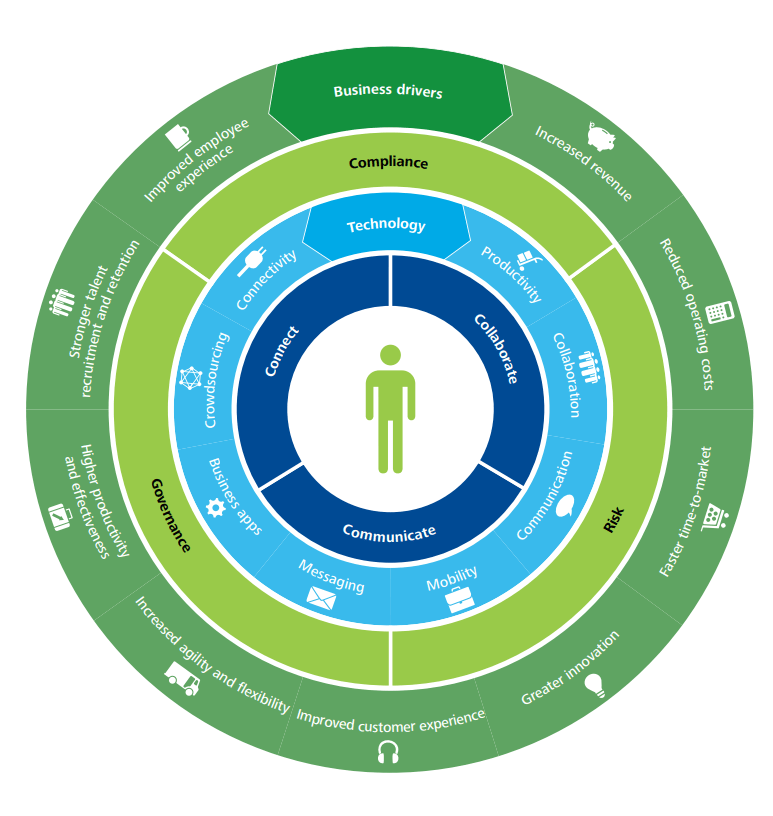
Deloitte has developed a four-layer framework to help govern the design of a digital workplace. This is a useful guide for those businesses looking for workplace transformation. This framework comprises of:
1) Use – for staff to collaborate, communicate and connect
2) Technology – the digital tools to enable staff to do their job
3) Control – having the right governance structure and compliance controls in place to reduce risk
4) Business drivers – measuring the outcomes and actual business value.
It explains how to leverage your investment to support a new and better way of doing business that will enhance both the employee experience and the customer experience.
Tips For Deploying A Digital Workplace
Here are some practical tips to help you blend your existing applications with new technology to create the ultimate user experience and a high-performing work environment.
1. Involve the right people to steer the project. Senior ownership is vital, but including representatives who will drive the technology is also key.
2. Ensure alignment with business strategy. Keep your big picture always in mind i.e. ‘will this new tool and process-change enable us to achieve our goals?’
3. Consider internal culture. How amenable will staff be to new technology and digital experiences? Develop an internal communications program to explain the benefits of digital technology and how vital it is in today’s workplace. And most of all, make it easy for staff to do their job.
4. Deliver business value. Avoid falling for the ‘shiny new thing’. Stay true to the original outcomes your business needs.
5. Research technologies. A good case study, a free trial, a call with a current user – these are all helpful ways to shortlist new technologies. There are multiple service providers playing in a very dynamic, competitive digital market.
6. Consider risk, compliance and legal consequences. There are important regulations surrounding data management and security that must be adhered.
Digital Workplace: Future Trends
What are the anticipated trends at play when today’s graduates become tomorrow’s C-suite, artificial intelligence is mainstream, and the traditional office is no more?
Here’s our view of the future and the role of the digital workplace:
Cloud-based Solutions
Effective, cloud services with unlimited access will be essential to support remote working
No Standing Still
Technology will continue to evolve, either organically or intentionally. Status quo is not an option
All-On Automation
Traditional ways of working will continue to be disrupted; automated processes will increase
Tech Choice Matters
Technology stack choices will become more important when attracting staff and tech compatibility
Staff Expectations
Young workers have a huge appetite for social tools and tech, increasing pressure for employers to invest
Customer Self-Service
Customers will want to search and solve their own questions independently, without speaking with an agent
Overwhelming Options
Choice-explosion of SaaS products could be overwhelming; apps may fail to work together
Employee Experience
Employers will try harder to motivate, engage, inspire and involve staff to retain talent
Tech Maze
Employees become ‘trapped in the tech maze’ with many apps overlapping and staff feeling bamboozled
❝
The Digital Workplace is a work in progress, an ongoing journey, with only 14% of companies believing they are at a ‘mature phase’.
Source: Digital Workplace Group
Digital Workplace Software
Core to the successful adoption of a digital attitude is finding ways to support staff as they navigate through the tech maze of the modern digital workplace, along with adjusting to working from home. While there are countless business apps and platforms suited to their specific areas of business, a central hub – or gateway if you like – where staff can access everything they need to complete their job is vital.
MyHub intranet software provides that central digital space for staff to communicate, share and source company information, regardless of their location. Our cloud-hosted, single access point makes life easier for staff, helping them do their job better.
From instant messaging to the seamless integration of business applications, workflow automation to access-controlled content libraries, MyHub brings together all this into a beautifully-sleek, easy-to-navigate digital workplace. All accessible with a single sign-on.
Digital Workplace Tools: The MyHub Difference
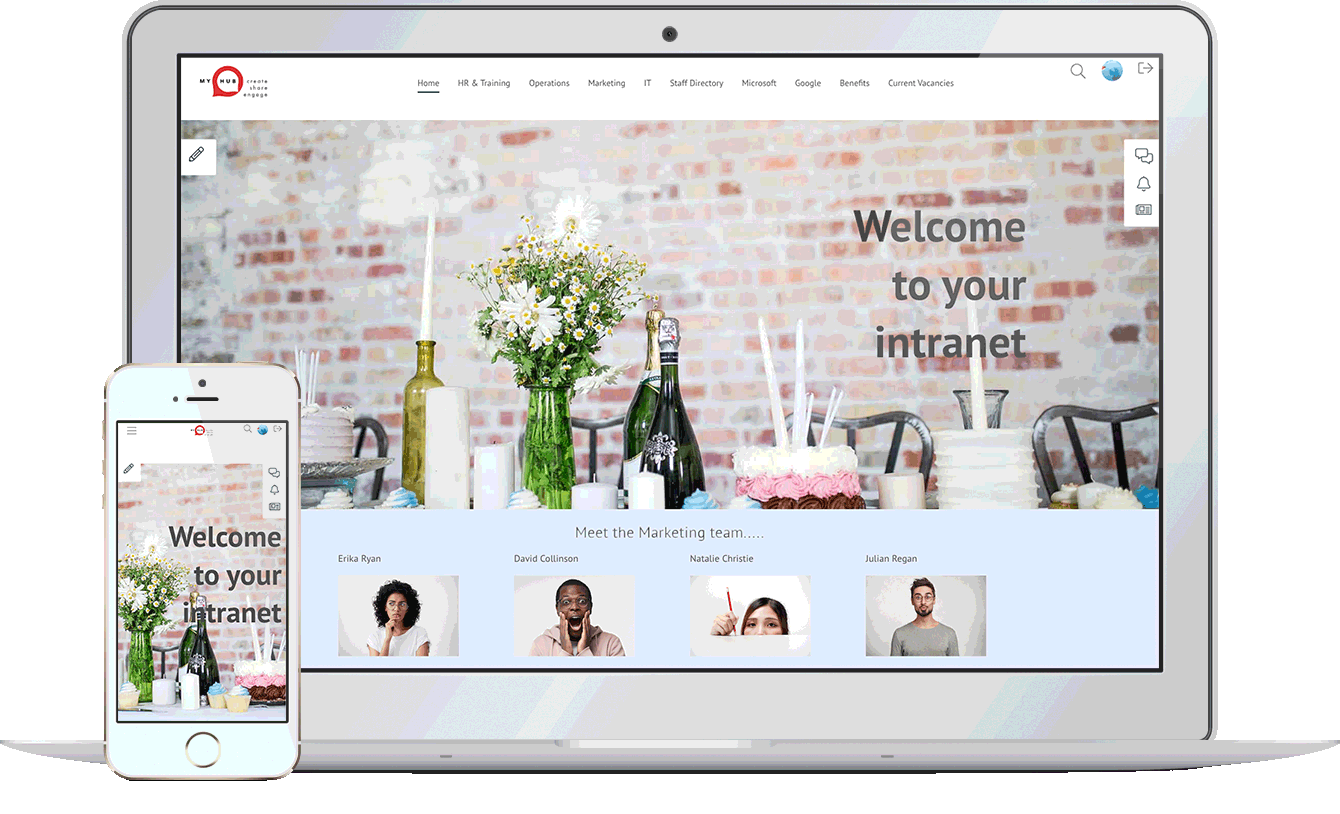
Considered the central hub of your digital workplace solution, MyHub is fully scalable, designed to support your company’s growth. And fully customizable, to meet your exact needs.
Designed with the non-technical buyer in mind, MyHub requires no coding skills or IT experience. It is simple to set-up – and fun to use!
Using simple drag-and-drop functionality, you can create a professional digital workspace in minutes! Being cloud-hosted also means you’re future-proofing your investment: you get to benefit from our latest new features and enhancements as soon as they’re released.
Let our technology unleash a smarter and super-efficient digital workplace solution that your staff will love.
❝
Managers have reduced the time spent on management activities by one to three hours due to system integration and collaboration tools
Useful Digital Workplace Resources
Franchise Intranet Software – The Social Intranet for Franchises
Franchise businesses face unique challenges due to their scale and distributed nature. With over 8.9 million workers contributing nearly $900 billion to the global economy, ensuring consistent communication, brand standards, and training across multiple locations is critical.
A franchise intranet serves as a secured online hub accessible only to franchisees and staff. It centralizes essential resources—like news, branding materials, onboarding modules, policy documents, discussion forums, and collaborative spaces—ensuring easy access and alignment across all sites.
Beyond centralization, these intranets enhance engagement through social features like news feeds and recognition programs. They also boost operational consistency via compliance tracking, read receipts, and automated workflows. The result? A scalable, efficient, and cohesive infrastructure that supports growth and performance across the entire franchise network.
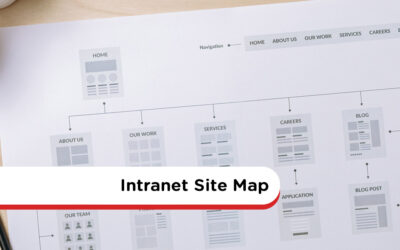
Intranet Site Map – Template & Tools
A well-designed intranet site map provides a visual blueprint of the intranet’s structure—clarifying how pages and tools connect. It streamlines navigation, highlights content overlap, and gives teams a clear framework for creating intuitive pathways throughout the digital workspace .
Developing your intranet architecture should involve cross‑department collaboration. Workshops with a steering group help establish logical content groupings—often using top-down (business categories) or bottom-up (task/user-based) approaches—to define parent and child page hierarchies. A tool like Gloomaps can simplify visual planning and capture stakeholder feedback effectively
Best practices include limiting top-level navigation to fewer than ten clear categories, avoiding ambiguous labels like “Other”, and keeping names simple yet descriptive. Testing the proposed structure with real user tasks helps validate usability. As needs evolve, the site map should stay flexible, updated, and aligned with organizational changes .

Internal Communication Strategy: 15 Effective Tips
Crafting an effective internal communication strategy is no small task—but it’s absolutely critical in today’s hybrid and remote-first businesses. A successful plan connects employees to your mission and boosts engagement, productivity, and retention, rather than leaving staff disconnected from leadership and purpose.
A complete strategy goes beyond just broadcasting news. It accounts for all communication flows—top-down from leadership, bottom-up feedback, lateral peer-to-peer interactions, and crisis or change communications. It also leverages diverse media: written posts, visual content, meetings, voice calls, and digital channels—each contributing to clarity and trust across teams.
Building the strategy begins by auditing current communication practices and capturing employee feedback, then setting clear SMART objectives tied to business outcomes. From there, you implement a phased action plan: forming a cross-functional team, segmenting audiences, choosing the right channels, creating a cadence, planning informal social spaces, and distributing the strategy widely. Rigorous measurement and frequent reviews help you refine the plan into a living, strategic asset.
20 Fun Ways To Welcome New Employees
Starting a new job can be overwhelming, even for seasoned professionals. MyHub highlights that a friendly and thoughtful welcome calms first-day jitters and accelerates employee integration—strengthening employee retention by up to 82% and improving productivity by 70%. The article introduces 20 creative ideas to make onboarding memorable and team-oriented from day one, whether in-office or remote.
Among the ideas for in-person experiences are sending a warm welcome email ahead of time, preparing the workspace with fun decorations, assembling a personalized welcome package with company swag, and having managers greet new hires at the entrance. Additional ideas include hosting a casual first-day party, organizing an interactive scavenger hunt, using a buddy or mentor system, and assigning the new hire a meaningful first project to boost confidence and ownership.
Recognizing the rise of remote and hybrid work, MyHub also offers seven digital-friendly onboarding ideas. These include sending a shout-out announcement via IM, ordering a lunch delivery, offering virtual tours, hosting an online scavenger hunt, using fun Zoom backgrounds, organizing a virtual happy hour, and arranging meet-and-greet sessions across departments. These ideas help remote employees feel connected and included right from the start.

Meeting Minutes: Sample, Format, How To Write
Effective meeting minutes serve as a concise, factual record of discussions, decisions, action items, and next steps. They help teams remember key takeaways, assign accountability, and support legal or compliance auditing—especially valuable for board meetings or multi-department gatherings.
The blog recommends starting with the meeting agenda to structure your notes, checking expectations with the facilitator, leveraging voice recordings when available, and sticking to past-tense, objective summaries rather than personal comments. Using a consistent template covering date, time, participants, agenda items, decisions, action points, and next meeting details ensures clarity and completeness .
Additional advice includes proofreading for consistency in tense and formatting, assigning tasks to named individuals with deadlines, and circulating minutes quickly to maintain relevance. Templates for board, team, and one-on-one meetings are provided in both Word and PDF formats to simplify adoption.

Marketing Intranet: 11 Ways To Get More For Your Marketing Buck
Marketing departments often face pressure to deliver results with limited resources. A marketing intranet helps maximize ROI by consolidating communication, collaboration, and resource sharing—all in one platform. It allows marketing teams to operate more efficiently, avoiding duplicate efforts and wasted time.
From planning new campaigns to launching products, a marketing intranet supports every stage. Collaborative workspaces enable smoother data gathering, integrated editing via Microsoft 365 or Google Workspace cuts down coordination lag, and homepage features like launch alerts ensure timely visibility. Centralized libraries for marketing collateral—such as templates, graphics, and case studies—with advanced search capabilities help teams self-serve what they need, reducing reliance on admins.
This platform also supports broader company alignment. CRM integration (e.g., Salesforce) delivers seamless access to customer data. Market research can be published enterprise-wide to inform strategic decisions in real time. Secure extranet access lets agencies, printers, or freelancers collaborate efficiently without compromising brand consistency. Internal blogs, campaign shoutouts, and real-time chat foster communication and recognition—reinforcing marketing’s visibility and influence.