
Digital Workplace
Enable remote working for staff and let technology, people and processes unite
Share. Engage. Connect

Today’s always-connected, instant-access working environment has questioned the need for office-based working. Like never before, staff are connecting and collaborating with their peers in real-time, from any location.
As more staff transition to a work-from-home scenario, digital workplace technology offers a vital agile setting for businesses. Digital workplace technology can improve productivity, creative thinking, and team collaboration.
While some organizations have already embraced a digital workplace culture, others are being forced unexpectedly into managing staff remotely. The silver lining for the latter cohort is that if done right, remote working can facilitate a smarter, faster, better operation. Businesses stand to benefit from increased employee engagement and all-round improved business performance.
What is the Digital Workplace?

One of the most accepted definitions of the digital workplace is “the alignment of technology, employees and business processes to improve operational efficiency and meet organizational goals”.
Gartner describes it as a way of enabling new, more effective ways of working; raising employee engagement and agility; and exploiting consumer-oriented styles and technologies.
It’s been dubbed as the fourth industrial revolution, the digital transformation.
New digital workplace practices are being embedded into everyday life, across every size and type of business. Artificial intelligence, automation, and machine learning technology are taking over manufacturing, service work, and many other essential business tasks. And while most companies acknowledge the benefits of digital working, many admit to lacking the technical knowledge to lead the way (source: McKinsey & Company).
Distributed Working: The New Normal

The way in which we spark ideas and get work done has changed forever. With more employers supporting the distributed workforce model – either through choice or an unexpected crisis – the practical side of completing tasks and communicating with colleagues now, more-often-than-not, takes place in a digital space. Indeed, many economists forecast the physical office will soon be a thing of the past, accelerated by the recent Covid-19 pandemic.
A distributed workforce – also known as remote workers, digital nomads, telecommuters or home office workers – work from any location, across multiple devices. They value work/life balance, flexible hours – and critically, the need to feel connected. Digital workplace technology provides this essential connection – emphasizing the importance of friction-free, easy-to-use software.
If the physical office is no longer a place we go to work, these digital touchpoints play a vital role in how employees stay motivated, informed and engaged in what they do.
The onus will be on the employer to optimize the digital workplace experience for employees. Security, fast access, as well as intuitive and compatible software are just some of the important considerations when transitioning into a digital world.
Key Benefits Of A Digital Workplace Strategy
The advantages of adopting a digital workplace strategy spread wider than most businesses originally anticipate. Here are some of the expected and unexpected benefits:
Team Collaboration
Improved levels of problem-solving, interaction and knowledge-sharing – all-round improved collaboration
Flexible Remote Working
Allows employees to work from home, supporting more flexible working
Productivity Boost
Increased efficiency and employee productivity through improved communications
Innovation
Great ideas can come from anywhere – not just the boardroom – if staff have the right channels
Change Management
Clear, reliable communications minimizes confusion and garners internal support
Improved Transparency
Improved traceability and transparency amongst teams, reducing errors
Hidden Savings
Decreased employee commuting expenses and business real estate cost
Employee Experience
Improved personal experiences through greater inclusivity and integration of tasks
Retain Talent
Lower employer turnover rates due to improved work/life balance and engagement
The Digital Workplace Framework
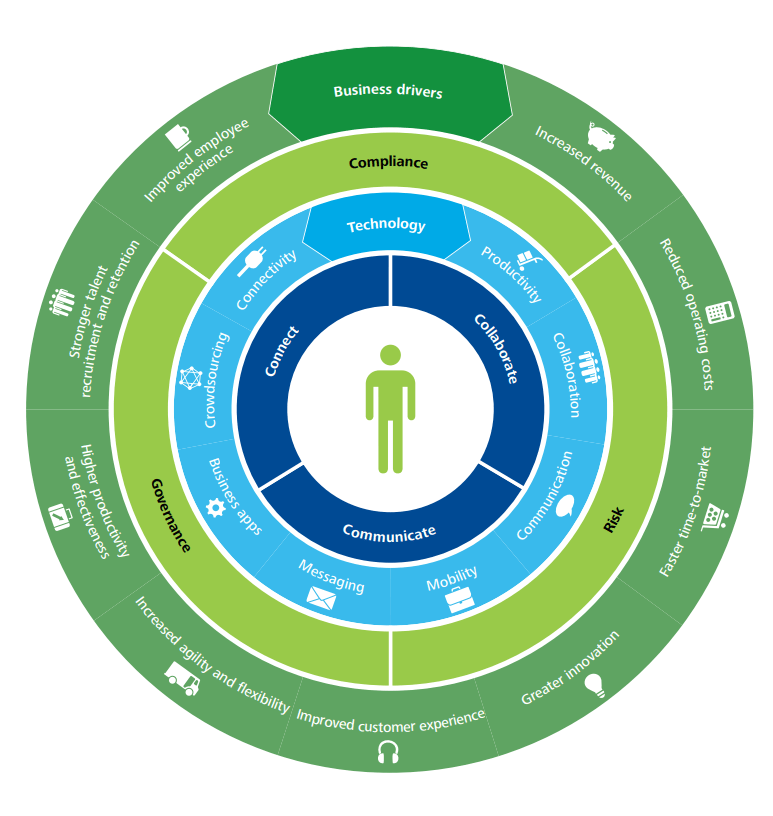
Deloitte has developed a four-layer framework to help govern the design of a digital workplace. This is a useful guide for those businesses looking for workplace transformation. This framework comprises of:
1) Use – for staff to collaborate, communicate and connect
2) Technology – the digital tools to enable staff to do their job
3) Control – having the right governance structure and compliance controls in place to reduce risk
4) Business drivers – measuring the outcomes and actual business value.
It explains how to leverage your investment to support a new and better way of doing business that will enhance both the employee experience and the customer experience.
Tips For Deploying A Digital Workplace
Here are some practical tips to help you blend your existing applications with new technology to create the ultimate user experience and a high-performing work environment.
1. Involve the right people to steer the project. Senior ownership is vital, but including representatives who will drive the technology is also key.
2. Ensure alignment with business strategy. Keep your big picture always in mind i.e. ‘will this new tool and process-change enable us to achieve our goals?’
3. Consider internal culture. How amenable will staff be to new technology and digital experiences? Develop an internal communications program to explain the benefits of digital technology and how vital it is in today’s workplace. And most of all, make it easy for staff to do their job.
4. Deliver business value. Avoid falling for the ‘shiny new thing’. Stay true to the original outcomes your business needs.
5. Research technologies. A good case study, a free trial, a call with a current user – these are all helpful ways to shortlist new technologies. There are multiple service providers playing in a very dynamic, competitive digital market.
6. Consider risk, compliance and legal consequences. There are important regulations surrounding data management and security that must be adhered.
Digital Workplace: Future Trends
What are the anticipated trends at play when today’s graduates become tomorrow’s C-suite, artificial intelligence is mainstream, and the traditional office is no more?
Here’s our view of the future and the role of the digital workplace:
Cloud-based Solutions
Effective, cloud services with unlimited access will be essential to support remote working
No Standing Still
Technology will continue to evolve, either organically or intentionally. Status quo is not an option
All-On Automation
Traditional ways of working will continue to be disrupted; automated processes will increase
Tech Choice Matters
Technology stack choices will become more important when attracting staff and tech compatibility
Staff Expectations
Young workers have a huge appetite for social tools and tech, increasing pressure for employers to invest
Customer Self-Service
Customers will want to search and solve their own questions independently, without speaking with an agent
Overwhelming Options
Choice-explosion of SaaS products could be overwhelming; apps may fail to work together
Employee Experience
Employers will try harder to motivate, engage, inspire and involve staff to retain talent
Tech Maze
Employees become ‘trapped in the tech maze’ with many apps overlapping and staff feeling bamboozled
❝
The Digital Workplace is a work in progress, an ongoing journey, with only 14% of companies believing they are at a ‘mature phase’.
Source: Digital Workplace Group
Digital Workplace Software
Core to the successful adoption of a digital attitude is finding ways to support staff as they navigate through the tech maze of the modern digital workplace, along with adjusting to working from home. While there are countless business apps and platforms suited to their specific areas of business, a central hub – or gateway if you like – where staff can access everything they need to complete their job is vital.
MyHub intranet software provides that central digital space for staff to communicate, share and source company information, regardless of their location. Our cloud-hosted, single access point makes life easier for staff, helping them do their job better.
From instant messaging to the seamless integration of business applications, workflow automation to access-controlled content libraries, MyHub brings together all this into a beautifully-sleek, easy-to-navigate digital workplace. All accessible with a single sign-on.
Digital Workplace Tools: The MyHub Difference
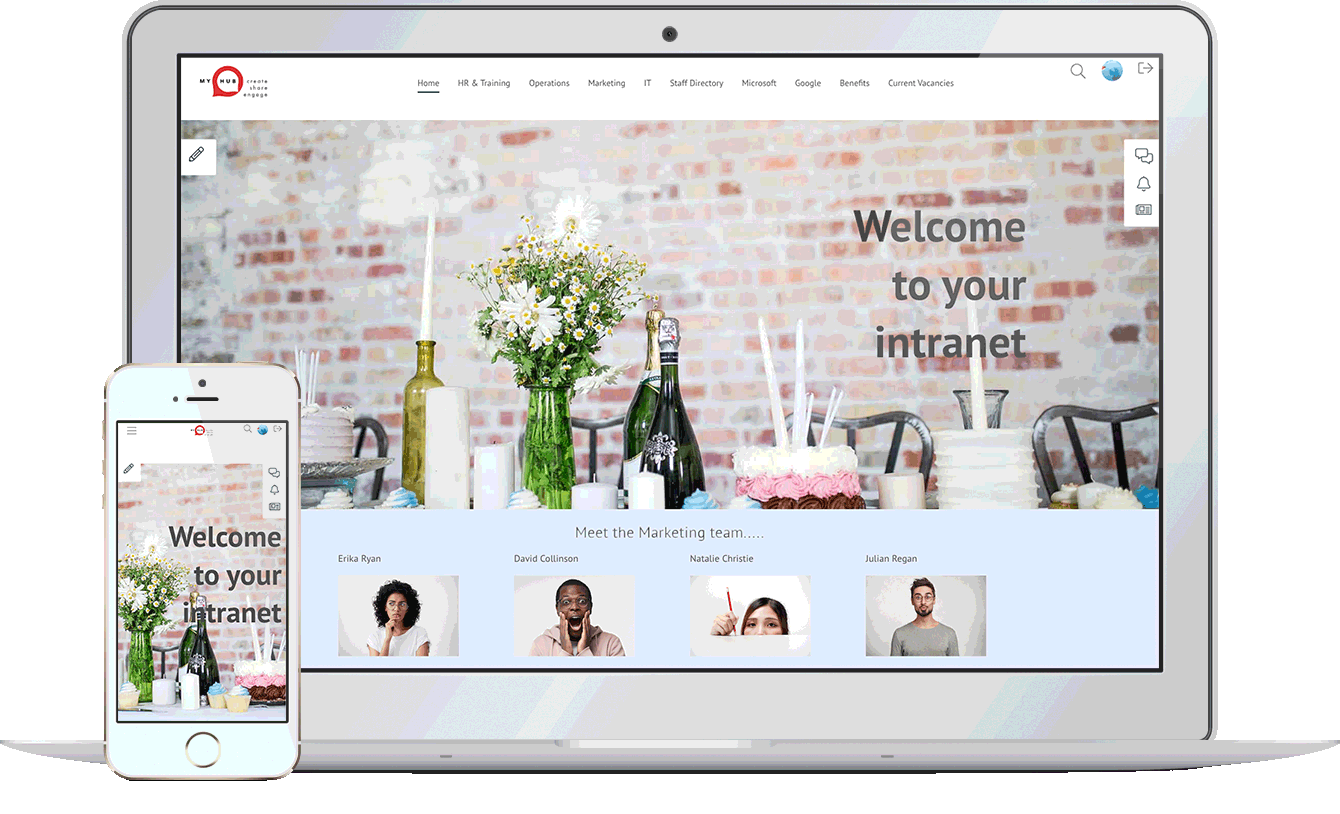
Considered the central hub of your digital workplace solution, MyHub is fully scalable, designed to support your company’s growth. And fully customizable, to meet your exact needs.
Designed with the non-technical buyer in mind, MyHub requires no coding skills or IT experience. It is simple to set-up – and fun to use!
Using simple drag-and-drop functionality, you can create a professional digital workspace in minutes! Being cloud-hosted also means you’re future-proofing your investment: you get to benefit from our latest new features and enhancements as soon as they’re released.
Let our technology unleash a smarter and super-efficient digital workplace solution that your staff will love.
❝
Managers have reduced the time spent on management activities by one to three hours due to system integration and collaboration tools
Useful Digital Workplace Resources
Intranet Security: How Secure Is Your Company Intranet?
A company intranet may feel like a secure, private network, but it’s still vulnerable to both external and internal threats. Malware, phishing, and unauthorized access can infiltrate through neglect or outdated protection. Meanwhile, insider issues—like weak passwords, human error, and over-permissive access—cause around 82% of data breaches.
To help fortify your intranet, start with key security measures: a robust firewall, antivirus protection, and SSL encryption to protect data in transit. Additionally, enforce strong authentication through SSO, Multi-Factor Authentication (MFA), and directory protocols like LDAP. Regular patching and updating of software close known vulnerabilities.
Successful intranet security requires an ongoing, multi-layered strategy. Limit and review user access based on roles, promptly revoke access during offboarding, and monitor connectivity—especially on personal devices. Incorporate security awareness training and simulated phishing exercises to empower employees against threats. Engage trusted hosted intranet providers who offer automatic updates, backups, and professional oversight.
WordPress Intranet: 7 Of The Biggest Challenges
WordPress can be used as a company intranet—either hosted locally or online—with themes like Woffice and plugins for access control, knowledge bases, social interaction, and project management. Yet, although it’s widely used (43 %+ of web platforms run on WordPress), it wasn’t designed as an intranet, and adapting it for internal use brings unique challenges .
One core challenge is deciding between building vs buying: a DIY WordPress intranet demands technical know-how, server space, and ongoing maintenance, while off-the-shelf plugins/themes may deliver limited capabilities and may become obsolete . You’ll also need a carefully chosen combination of intranet plugins—BuddyPress, knowledge base tools, project managers, Google Drive embedders, access restrictions—and a theme that supports intranet design.
Finally, usability and support significantly affect adoption. While WordPress offers “5-minute installs” and user-friendly basics, building an intranet adds complexity. Many users find it more taxing than expected, especially without IT expertise, and ultimately pivot to purpose-built platforms for ease and long-term scalability.
Employee Directory Software: The Intranet Solution
The blog highlights that while standalone employee directory tools are prevalent, an intranet solution—like MyHub—offers a superior, all-in-one experience. Beyond basic contact lists, an integrated directory features rich profiles, photos, biographies, expertise tags, and project highlights. This makes discovering and connecting with colleagues intuitive and engaging.
A modern integrated directory fosters better working relationships and employee engagement by breaking down organizational silos. Customizable profiles empower employees to showcase skills and contributions, making interdepartmental collaboration smoother. It also humanizes teams, easing onboarding and reducing communication friction—no more forgotten names or awkward intros.
Additionally, network-enabled directories help reinforce company culture. They give employees a sense of identity and belonging by illustrating how each individual fits into the larger mission. Easy-to-use features—such as self-updating profiles and straightforward search—ensure adoption remains high, keeping the directory current and relevant.

HR Intranet Portal: 10 Compelling Benefits For Human Resources
An HR intranet portal is a centralized digital workspace that places HR policies, forms, training, and news at employees’ fingertips—24/7, across any device. It’s built to empower staff with self-service options and reduce repetitive administrative tasks for HR teams, improving efficiency and accessibility for both in-office and remote workers
The platform’s strength lies in streamlined processes like leave management, appraisals, recruitment, and onboarding, all supported by automated routing and powerful search. This not only saves time but also ensures consistency and compliance in documentation. Rich two-way communication tools—such as blogs, forums, instant messaging, and surveys—cultivate a connected, inclusive culture regardless of where teams are based
Engagement is further boosted through social features, recognition tools, directories, and wellness resources. HR portals help build relationships, reinforce employer branding, and track engagement metrics through quizzes, feedback, and exit surveys. Plus, they eliminate login fatigue by integrating third-party apps (like Microsoft 365, Salesforce) via single sign-on under one digital roof .
Website For Employees: Top 17 Essential Features
A modern website for employees, often called an intranet, serves as a centralized hub to streamline communication, collaboration, and connection for team members—both in-office and remote. MyHub’s blog outlines 17 essential features, beginning with team & company-wide newsfeeds, business instant messaging, and staff profiles that humanize coworkers and strengthen engagement. These tools make finding updates and colleagues faster and more intuitive, replacing cluttered emails and shared drives.
Beyond communication, the intranet becomes a powerful productivity engine. It combines a centralized information hub with smart search, automated requests and approvals, project workspaces, and knowledge management tools like forums, wikis, surveys, and quizzes. This consolidation reduces wasted time, ensures employees can quickly access SOPs, policies, training content, and collaboration spaces without hopping between apps.
Employee experience is further enriched through onboarding support, learning & development portals, employee recognition, and fun social features. An intranet that includes mobile-first design, enterprise app integration, and gamification elements—like shout-outs and contests—boosts adoption and culture. MyHub emphasizes that unless a staff website is built around employee needs, it likely won’t engage users—which is why those 17 features are mission-critical .
Instant Messaging In The Workplace – All You Need To Know
Instant messaging (IM) has revolutionized internal communications, enabling employees to connect seamlessly via text, video, voice, and file sharing in real time. Unlike email or phone calls, IM supports group channels, @mentions, hashtags, and presence indicators—ideal for fast-paced or hybrid work environments where timely interactions matter.
IM offers significant efficiency gains: quicker answers, reduced email volume, improved collaboration, and measurable productivity increases—66 % of users report faster query resolution, while 75 % see fewer calls and emails thanks to chat usage. It also enhances team cohesion, especially in remote settings, by encouraging informal chats (#coffeebreak), emoji reactions, and social recognition that mimic in-person interactions.
However, IM isn’t without drawbacks. Uncontrolled notifications can distract, security vulnerabilities may arise without proper safeguards, and reliance on chat alone can erode deeper connections fostered through richer communication channels. To strike a healthy balance, organisations are advised to implement clear IM guidelines—covering etiquette, work‑life boundaries, content appropriateness, and integration strategies to align chat tools with existing systems .