
Digital Workplace
Enable remote working for staff and let technology, people and processes unite
Share. Engage. Connect

Today’s always-connected, instant-access working environment has questioned the need for office-based working. Like never before, staff are connecting and collaborating with their peers in real-time, from any location.
As more staff transition to a work-from-home scenario, digital workplace technology offers a vital agile setting for businesses. Digital workplace technology can improve productivity, creative thinking, and team collaboration.
While some organizations have already embraced a digital workplace culture, others are being forced unexpectedly into managing staff remotely. The silver lining for the latter cohort is that if done right, remote working can facilitate a smarter, faster, better operation. Businesses stand to benefit from increased employee engagement and all-round improved business performance.
What is the Digital Workplace?

One of the most accepted definitions of the digital workplace is “the alignment of technology, employees and business processes to improve operational efficiency and meet organizational goals”.
Gartner describes it as a way of enabling new, more effective ways of working; raising employee engagement and agility; and exploiting consumer-oriented styles and technologies.
It’s been dubbed as the fourth industrial revolution, the digital transformation.
New digital workplace practices are being embedded into everyday life, across every size and type of business. Artificial intelligence, automation, and machine learning technology are taking over manufacturing, service work, and many other essential business tasks. And while most companies acknowledge the benefits of digital working, many admit to lacking the technical knowledge to lead the way (source: McKinsey & Company).
Distributed Working: The New Normal

The way in which we spark ideas and get work done has changed forever. With more employers supporting the distributed workforce model – either through choice or an unexpected crisis – the practical side of completing tasks and communicating with colleagues now, more-often-than-not, takes place in a digital space. Indeed, many economists forecast the physical office will soon be a thing of the past, accelerated by the recent Covid-19 pandemic.
A distributed workforce – also known as remote workers, digital nomads, telecommuters or home office workers – work from any location, across multiple devices. They value work/life balance, flexible hours – and critically, the need to feel connected. Digital workplace technology provides this essential connection – emphasizing the importance of friction-free, easy-to-use software.
If the physical office is no longer a place we go to work, these digital touchpoints play a vital role in how employees stay motivated, informed and engaged in what they do.
The onus will be on the employer to optimize the digital workplace experience for employees. Security, fast access, as well as intuitive and compatible software are just some of the important considerations when transitioning into a digital world.
Key Benefits Of A Digital Workplace Strategy
The advantages of adopting a digital workplace strategy spread wider than most businesses originally anticipate. Here are some of the expected and unexpected benefits:
Team Collaboration
Improved levels of problem-solving, interaction and knowledge-sharing – all-round improved collaboration
Flexible Remote Working
Allows employees to work from home, supporting more flexible working
Productivity Boost
Increased efficiency and employee productivity through improved communications
Innovation
Great ideas can come from anywhere – not just the boardroom – if staff have the right channels
Change Management
Clear, reliable communications minimizes confusion and garners internal support
Improved Transparency
Improved traceability and transparency amongst teams, reducing errors
Hidden Savings
Decreased employee commuting expenses and business real estate cost
Employee Experience
Improved personal experiences through greater inclusivity and integration of tasks
Retain Talent
Lower employer turnover rates due to improved work/life balance and engagement
The Digital Workplace Framework
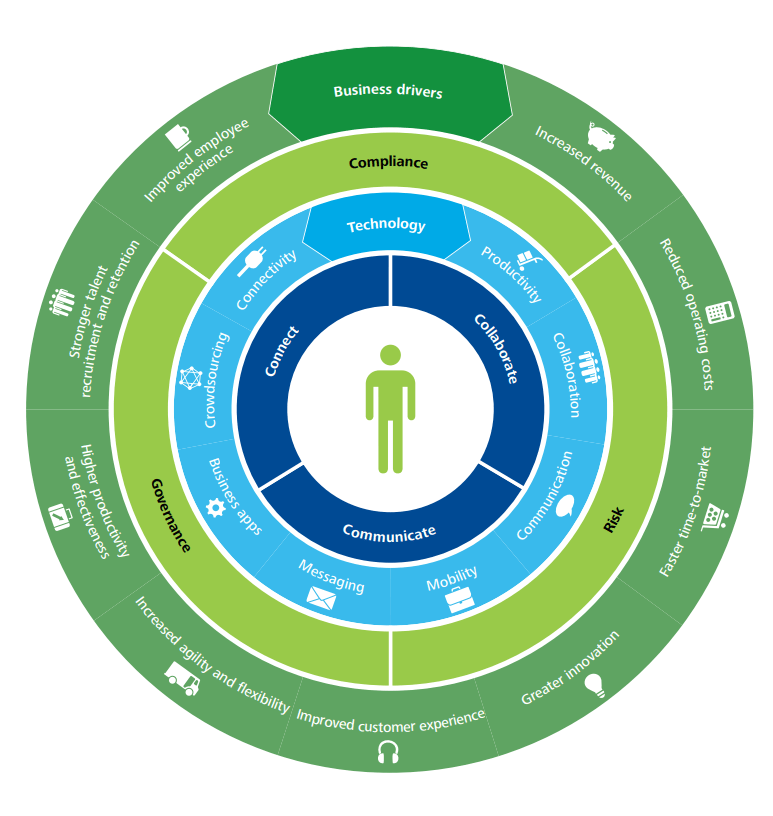
Deloitte has developed a four-layer framework to help govern the design of a digital workplace. This is a useful guide for those businesses looking for workplace transformation. This framework comprises of:
1) Use – for staff to collaborate, communicate and connect
2) Technology – the digital tools to enable staff to do their job
3) Control – having the right governance structure and compliance controls in place to reduce risk
4) Business drivers – measuring the outcomes and actual business value.
It explains how to leverage your investment to support a new and better way of doing business that will enhance both the employee experience and the customer experience.
Tips For Deploying A Digital Workplace
Here are some practical tips to help you blend your existing applications with new technology to create the ultimate user experience and a high-performing work environment.
1. Involve the right people to steer the project. Senior ownership is vital, but including representatives who will drive the technology is also key.
2. Ensure alignment with business strategy. Keep your big picture always in mind i.e. ‘will this new tool and process-change enable us to achieve our goals?’
3. Consider internal culture. How amenable will staff be to new technology and digital experiences? Develop an internal communications program to explain the benefits of digital technology and how vital it is in today’s workplace. And most of all, make it easy for staff to do their job.
4. Deliver business value. Avoid falling for the ‘shiny new thing’. Stay true to the original outcomes your business needs.
5. Research technologies. A good case study, a free trial, a call with a current user – these are all helpful ways to shortlist new technologies. There are multiple service providers playing in a very dynamic, competitive digital market.
6. Consider risk, compliance and legal consequences. There are important regulations surrounding data management and security that must be adhered.
Digital Workplace: Future Trends
What are the anticipated trends at play when today’s graduates become tomorrow’s C-suite, artificial intelligence is mainstream, and the traditional office is no more?
Here’s our view of the future and the role of the digital workplace:
Cloud-based Solutions
Effective, cloud services with unlimited access will be essential to support remote working
No Standing Still
Technology will continue to evolve, either organically or intentionally. Status quo is not an option
All-On Automation
Traditional ways of working will continue to be disrupted; automated processes will increase
Tech Choice Matters
Technology stack choices will become more important when attracting staff and tech compatibility
Staff Expectations
Young workers have a huge appetite for social tools and tech, increasing pressure for employers to invest
Customer Self-Service
Customers will want to search and solve their own questions independently, without speaking with an agent
Overwhelming Options
Choice-explosion of SaaS products could be overwhelming; apps may fail to work together
Employee Experience
Employers will try harder to motivate, engage, inspire and involve staff to retain talent
Tech Maze
Employees become ‘trapped in the tech maze’ with many apps overlapping and staff feeling bamboozled
❝
The Digital Workplace is a work in progress, an ongoing journey, with only 14% of companies believing they are at a ‘mature phase’.
Source: Digital Workplace Group
Digital Workplace Software
Core to the successful adoption of a digital attitude is finding ways to support staff as they navigate through the tech maze of the modern digital workplace, along with adjusting to working from home. While there are countless business apps and platforms suited to their specific areas of business, a central hub – or gateway if you like – where staff can access everything they need to complete their job is vital.
MyHub intranet software provides that central digital space for staff to communicate, share and source company information, regardless of their location. Our cloud-hosted, single access point makes life easier for staff, helping them do their job better.
From instant messaging to the seamless integration of business applications, workflow automation to access-controlled content libraries, MyHub brings together all this into a beautifully-sleek, easy-to-navigate digital workplace. All accessible with a single sign-on.
Digital Workplace Tools: The MyHub Difference
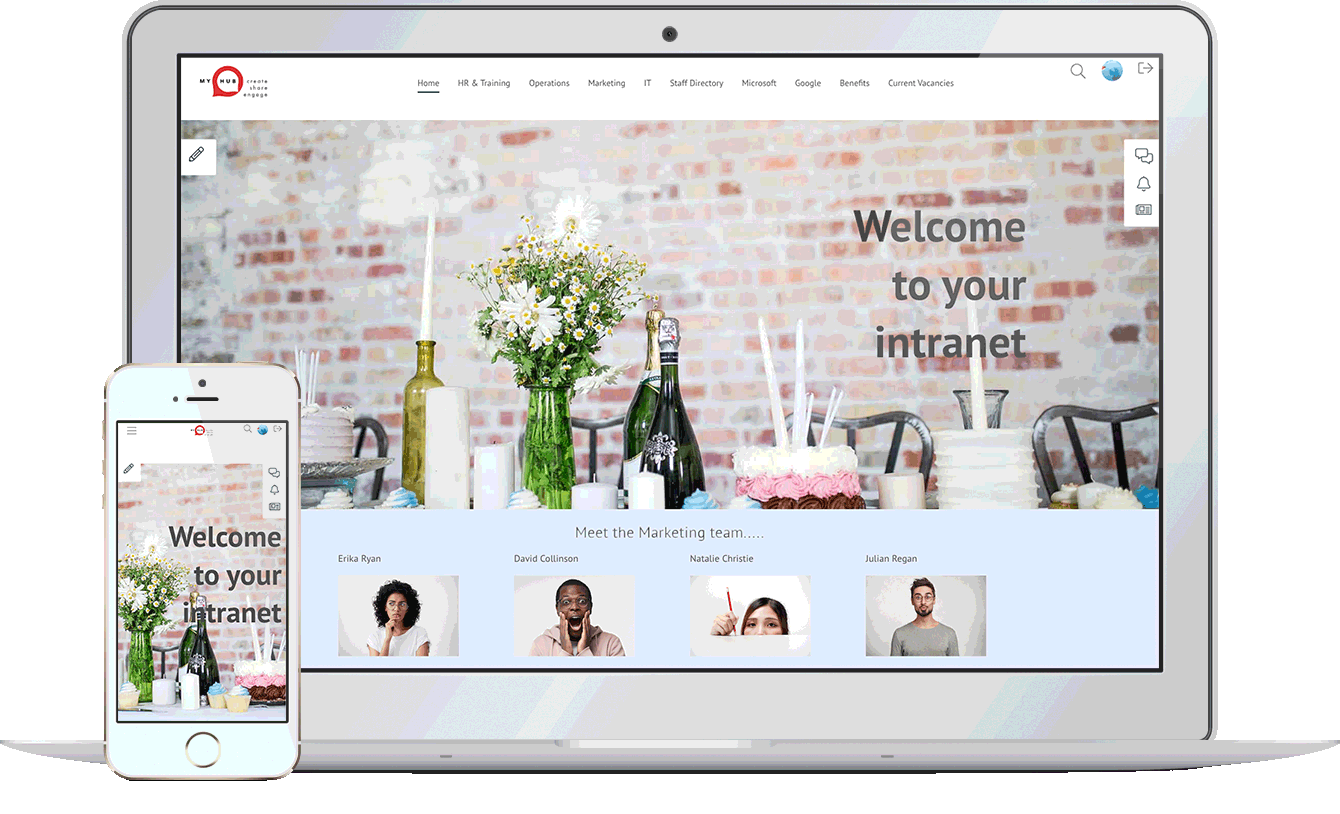
Considered the central hub of your digital workplace solution, MyHub is fully scalable, designed to support your company’s growth. And fully customizable, to meet your exact needs.
Designed with the non-technical buyer in mind, MyHub requires no coding skills or IT experience. It is simple to set-up – and fun to use!
Using simple drag-and-drop functionality, you can create a professional digital workspace in minutes! Being cloud-hosted also means you’re future-proofing your investment: you get to benefit from our latest new features and enhancements as soon as they’re released.
Let our technology unleash a smarter and super-efficient digital workplace solution that your staff will love.
❝
Managers have reduced the time spent on management activities by one to three hours due to system integration and collaboration tools
Useful Digital Workplace Resources

145 Digital Transformation Statistics You Need To Know
Digital transformation (DX) remains central to business strategy, especially post-pandemic. Organizations worldwide are rapidly increasing DX initiatives—97% of IT decision-makers are involved, and spending is projected to rise from $1.8 T in 2022 to $2.8 T by 2025. Despite this focus, most IT budgets (50–72%) still go toward maintenance rather than innovation, prompting rebalancing concerns.
Today, more than 90% of companies are undertaking DX projects and 87% of executives consider it a priority, yet only 44% feel prepared for disruption. Key drivers include operational efficiency (40%), faster time-to-market (36%), and improved customer experience (35%). However, DX failures often stem from employee resistance, lack of ROI clarity, and digital skills gaps—making cultural and human factors as critical as technology.
Looking ahead, DX trends point to continued investment—forecasted at 18% CAGR through 2030—with increased focus on hybrid work, AI, cloud, IoT, and employee experience platforms . Digital transformation is reshaping organizational structures, workflows, and customer interactions, making data-driven planning essential for staying competitive.

Team Celebration: The How, What, And Why
Celebrating team successes shouldn’t be reserved only for major milestones like big deals or record-breaking figures. According to the article, recognizing even small wins—such as completing a project or positive customer feedback—can have a powerful ripple effect by enhancing employee retention, productivity, and overall morale. Organizations are encouraged to make recognition a consistent part of their culture to reinforce positive behaviors and foster pride.
The guide outlines when to celebrate—such as first wins, project completions, role changes, or employee anniversaries—and how to do it creatively across different work environments. It offers practical ideas: in-person team outings, award ceremonies, meeting shout-outs, virtual lunches, care packages, and digital timelines. This ensures celebrations are relevant whether your team is in-office, remote, or hybrid
The post also addresses the importance of balancing public and private recognition. While team-wide shout-outs build unity, personal acknowledgments—like handwritten notes or one-on-one feedback—resonate deeply. Finally, it warns against misuse: avoid over-celebration, ensure equity, consider sensitivity (e.g., budget cuts), and follow up beyond one-off events . Together, these practices build a positive, inclusive celebration culture that benefits both people and the organization.
Internal Website: Uses, Features And Setup
A modern internal website—also known as an intranet—is a secure, employee-only platform that centralizes everything staff need: company news, documents, tools, and applications. Unlike external sites, intranets often suffer from outdated content and poor navigation, yet play a pivotal role in internal communications, information sharing, and teamwork
This guide outlines how intranets enhance information management, featuring integrated search, cloud document libraries, and a central hub to streamline access and eliminate inefficient shared drives. It also improves internal communication via interactive news feeds, blogs, and surveys—especially crucial for hybrid or remote workforces . Beyond communication, intranets support collaboration and automated workflows, enabling real-time document co-editing, team forums, and form-based process automation for tasks like leave requests, approvals, and reporting .
To roll out an effective internal website, the blog recommends evaluating three build options—DIY, off-the-shelf tools, or cloud-based intranet software. It emphasizes essential features: intuitive setup, mobile responsiveness, high usability, cost effectiveness, and ready-to-go deployment. Templated cloud intranets stand out for quick deployment, mobile optimization, single sign-on, and user familiarity

Business Casual Dress Code For Workplaces
Business casual blends traditional office attire with a relaxed touch—think slacks, button-downs, blouses, chinos, knee-length skirts, and closed-toe shoes—but always polished and appropriate for your workplace. The guide highlights that the exact definition varies by industry, company culture, and format—what’s suitable in a startup may differ markedly from expectations in a law firm .
For men, staples include button-down shirts, fine knit sweaters, slacks or chinos, optional blazers, and polished closed-toe shoes . Women can choose from smart sweaters, blouses, structured dresses or skirts, tailored trousers, and modest heels or flats . The blog also addresses adaptable remote-work attire, emphasizing at least being presentable from the waist up for video calls .
It provides a handy cheat sheet of do’s and don’ts: no hoodies, crop tops, athletic wear, or flip-flops; avoid overly tight, baggy, or wrinkled clothes . When in doubt, err on the side of slightly overdressing, observe leadership, and adapt to seasonal changes while maintaining professionalism.

No Call No Show Policy In Four Easy Steps
The article highlights how unplanned absences—especially when employees neither call nor show up—pose significant challenges for organizations, disrupting schedules and putting pressure on teams. It stresses the necessity for businesses to adopt proactive strategies that not only discourage no-calls but also treat employees fairly, maintaining morale and trust.
Central to the proposed framework is crafting a clear and comprehensive attendance policy that defines what constitutes a no-call, no-show incident, outlines acceptable reporting methods, and communicates consequences transparently. Ensuring employees are well-informed through induction training and accessible handbooks is essential, as is offering multiple channels—such as phone lines, email, or intranet forms—for reporting absences, which helps accommodate emergencies or sudden situations.
Consistent enforcement of the policy is equally vital, with organizations expected to document incidents, apply disciplinary measures when warranted, and approach each case with empathy when genuine circumstances arise. By blending accountability with understanding and leveraging digital tools to streamline reporting, companies create a balanced and supportive attendance culture that benefits both employees and operational continuity.
Communication Matrix: A Step By Step Guide With Free Template
A communication matrix is a strategic tool designed to organize and streamline internal communications across projects, teams, and the whole organization by mapping content, audience, frequency, channel, and ownership into a clear, one-page framework. Especially valuable for hybrid and remote environments, it helps teams decide what to communicate, when, to whom, and through which medium—making sure nobody is left out or overwhelmed .
The guide dives into the essential components—content, purpose, frequency, audience, deliverables, channels, and owners—and explains how these elements work together to make communication purposeful and consistent. It emphasizes using a simple tool like Excel or Google Sheets for easy setup and live collaboration.
The article also outlines key benefits: faster decision-making, higher transparency, optimized resource use, better collaboration, and adaptability to change. With included real-world examples—a monthly newsletter and project-team matrix—and a free download link, it shows how quick and impactful implementing this tool can be.