
Team Collaboration
How To Help Staff Connect, Encourage Ideas, And Move Work Forward
Share. Communicate. Innovate

Team collaboration is a prominent trait among today’s winning organizations. Done right, collaboration aids better decision-making, innovative thinking and improved productivity. Staff are happier, performance is boosted, and there’s less risk of error.
But many organizations have yet to figure out how to help colleagues work better together to achieve a common goal.
The good news is that there are tools and techniques that have proven to nurture a strong collaborative culture within the workplace.
Here, we shed light on the causes of poor collaboration, tips for improvement, and collaboration software that enables co-workers to share ideas and improve internal communications.
What Is Team Collaboration?

The definition of team collaboration is when two or more people work together to achieve a common goal. This is done through idea sharing, planning and executing in unison. In contrast to working on one’s own, team collaboration is regarded as a more productive way to get work done, and carries less risk.
Tackling a major project – such as a new product launch or the introduction of a new internal process – usually requires a teamwork approach. This entails bringing together a group of employees to allocate and complete tasks, within a set timeframe.
These days, with technology overcoming geographical barriers, virtual teams are popular. Companies are now appointing the best people for a project – regardless of their work location – to form part of a team and collaborate. This development has created new opportunities for businesses to innovate – but is not without its challenges.
Why Is Team Collaboration Critical In The 21st Century?

Never before has the workplace been so diverse. For the first time in history, five generations are working side-by-side. Each employee has a unique perspective. Their opinions are formed by their own personal experiences. And they have different communication styles – some prefer face-to-face, others the written word.
Such differences are a lot to manage, particularly when complex, project-based decisions must be made.
How a team interacts with each other will influence the final outcome. Communication, knowledge transfer and equal respect for each team member are essential for a high-performing team.
Younger generations joining the workforce are eager to further develop the collaborative skills they’ve learnt during education. They place place greater support on social tools for collaboration than their older colleagues (49 per cent millennials vs 31 per cent baby boomers). And considering that 46 per cent of 2020’s workforce are millennials (compared with 36 per cent six years ago), employers must act upon this growing generation’s preference for building team dynamics.
Furthermore, around 75% of employees now rate teamwork and collaboration as crucial to their performance.
Reasons For Poor Team Collaboration
It’s a common scenario when a collection of people come together to solve a problem, cross-functionally. There may be representatives in the room from IT, Sales, Product and Finance.
When collaboration fails, it’s often because these individuals partially listen to others points-of-view, but do not fully seek to understand what they were actually saying.
Each representative remains in their own paradigm rather than genuinely taking on board and seeking a solution based on other perspectives.
To counter this, effective collaboration requires recognition of diversity; that each individual has their own thought process and purpose. This requires greater understanding of the team individuals, and the concerns they may be feeling.
These could include the following:
- Skepticism about the success of the project i.e.‘doomed to fail’
- Uncertainty around who does what in the team, and where tasks and responsibilities sit
- Misinterpretation or miscommunication: wrongly assuming all staff have the same understanding
- Lack of direction, KPIs and milestones set out from the start
- Conflicting priorities: failing to appreciate an employee’s current workload before adding more
- Forcing staff to communicate in ways that may be uncomfortable for them i.e. introverted employees making team presentations
How To Improve Team Collaboration
Successful team collaboration is hard work. With so much to consider – silos, company culture, staff at different locations, leadership styles – good team collaboration doesn’t happen by accident.
Furthermore, Harvard Business Review has exposed an interesting paradox at play, based on its research into team behavior:
“Although teams that are large, virtual, diverse, and composed of highly educated specialists are increasingly crucial with challenging projects, those same four characteristics make it hard for teams to get anything done.
“To put it another way, the qualities required for success are the same qualities that undermine success. Members of complex teams are less likely to share knowledge freely, to learn from one another, to shift workloads flexibly to break up unexpected bottlenecks, to help one another complete jobs and meet deadlines, and to share resources.”
It also found that the higher the educational level of the team member, the more challenging collaboration appears for them.
But there are some best practices for building effective collaboration strategies, as follows:
Define And Repeatedly Communicate The Team’s Goals
This is the first step to bringing together a group of people. Goals should be reiterated at the start of daily huddles, referred to when key decisions are underway, and repeated across all communication channels (your intranet, for example).
Promote Open Communication Particularly When Faced With A Roadblock
This is where technology has become a game-changer. Instead of waiting for the next round-table meeting to overcome a roadblock, intranet tools such as forums, instant messaging, and shared files allow members of the same team to work through a problem collaboratively at pace.
Create Structure Within Meetings And Give Staff Time To Prepare
WIP (work-in-progress) meetings are an important part of effective project management. Ahead of each meeting, share agenda items, action lists and related reading material with all members of the team so there are no frustrating delays when teams meet.
Encourage Creativity And Free-thinking: All Ideas To Be Respected
Brainstorming sessions can be fun and fruitful. Team leaders must give advance warning though so staff can do their own research. And if you’re the manager, resist the urge to direct and jump in immediately with your ideas, as staff may feel obliged to follow.
Log Important Decisions And Their Backstory
Avoid the “he said/she said” nature of spontaneous conversations; make sure ideas are contextually documented in a central space, accessible for all, and not lost in the moment.
Invest in Collaboration Tools
Team collaboration tools have shown the way here. Employees can set up team channels where decisions can be made in real-time. Slack, the popular chat tool, has been joined by a host of other instant messaging tools, virtually eliminating the need for traditional email. Video conferencing, in the wake of Covid-19, has become the default meeting format. And forums are another effective channel for effective team collaboration.
Check For Understanding
Nodding heads does not necessarily mean agreement and understanding. Many co-workers won’t like to admit they don’t understand something. Reiterate major decisions – during and after meetings – providing clarity and an opportunity for others to ask further questions. Engage in two-way communication with all members when possible.
Create Ways For Less Outspoken Team Members To Contribute Ideas
Not everyone has public speaking skills. Shy people will not feel comfortable sharing their idea in a room full of colleagues, but may happily submit an idea via a forum or chat channel. Make it known that individual thinking is unique and valued, and that every team member should be able to communicate with equality and authority.
Share Experience, Knowledge And Resources
Use an intranet to capture treasured insights – physically and virtually with file-sharing software. This will save mistakes being repeated, and knowledge walking out the door when someone leaves. Don’t leave this to chance: embed a process for eliciting and storing this valuable intelligence as part of your regular WIP meetings. Add tags to meeting notes that can be searched for later on.
Acknowledge And Celebrate Individual And Team Success
Highlight individual qualities and the special skills that each team member brings to the table. Go big when a milestone or key task has been ticked off with a team building celebration event. This boosts morale and makes people feel valued.
Appoint Task And Relationship-Oriented Leaders
HBR research found that the most productive and innovative teams had leaders who could outline clear goals and responsibilities and easily switch to relationship-building mode i.e. smoothing out internal tensions.
Limit Group Sizes
Not always possible – particularly if you’re about to organize the next Olympics – but aim to keep teams small enough so that staff get to know (and respect) each other, and ideas exchange freely. Big teams tend to be more vulnerable to tunnel vision, or the ‘squeakiest wheel wins’.
❝
Collaborative teams are 5 x higher performing as they feel motivated towards a common goal
Source: i4cp
Team Collaboration Trends
Team Collaboration tools are evolving to suit the changing needs of businesses today.
Flexibility, scalability, and compatibility with existing systems increasingly matter. Because of this, enterprise players such as Cisco, Slack and Microsoft have no choice but to integrate with each other.
Some other noticeable trends in team collaboration include:
Artificial Intelligence
Machine learning tools and bots can help an entire team improve the way they collaborate by making it easier to find information instantly. They can also offer things like real-time translation and transcribing during video conferencing meetings.
Unique Experiences
As more technology vendors come to the integration and interoperability party, open-source platforms with the help of APIs are enabling employers to build their own collaboration experience, just right for their internal culture.
Love Of Video
This format’s popularity continues to rise, but so do expectations around its performance. With remote teams the new normal, businesses are relying more on video conferencing, which must be reliable, secure and consistent.
Team Collaboration Software
Creating a workplace using team collaboration software is a practical move that can really transform how you and your colleagues collaborate.
MyHub’s cloud-based intranet is designed specifically for organizations in search of an affordable and adaptable collaboration solution. It’s fully scalable, designed to support your company’s growth. And fully customizable, to meet your exact needs.
Combining a company internal newsfeed, instant messaging and secure cloud storage, MyHub is the perfect choice for your important projects-in-progress.
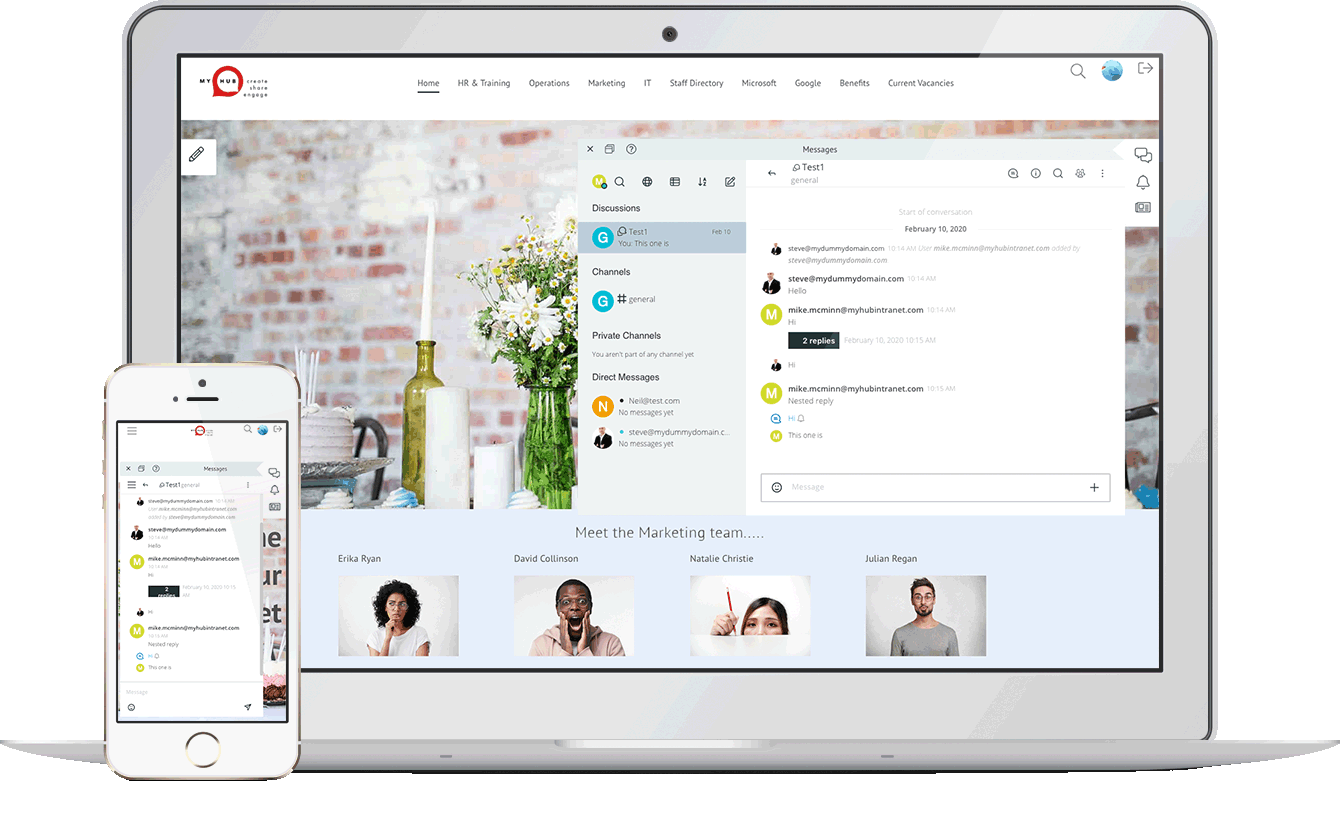
Whether you’re an IT pro or completely non-technical, MyHub’s cloud-hosted solution offers all the features and functionality you’ll ever need.
We’ve made it so that it’s super simple to set-up (no coding skills or IT experience required) – and is enjoyable to use!
Using simple drag-and-drop functionality, you can create a professional space for your team to start collaborating in minutes! Being cloud-hosted also means you’re future-proofing your investment: you get to benefit from our latest new features and enhancements as soon as they’re released.
Useful Team Collaboration Resources

Salesforce Intranet: Save Money With A Winning Combination
Integrating Salesforce with your company’s intranet offers a powerful solution to enhance internal communication and collaboration. By centralizing access to Salesforce data within the intranet, employees can seamlessly retrieve customer information, track sales activities, and manage tasks without switching between platforms. This integration not only improves efficiency but also ensures that teams are aligned and informed.
The blog post delves into the cost-saving benefits of this integration. By reducing the need for multiple software licenses and minimizing training requirements, organizations can allocate resources more effectively. Additionally, the streamlined workflows lead to faster decision-making and improved customer service, further contributing to the bottom line.
MyHub Intranet provides practical guidance on implementing this integration, highlighting best practices and potential challenges. With the right approach, businesses can leverage the combined power of Salesforce and their intranet to drive productivity and achieve strategic goals.

10 Reasons Why Cross-Team Collaboration Is Important
In today’s dynamic workplace, cross-team collaboration is no longer a nice-to-have—it’s a necessity. By bringing together employees from different departments, organizations can harness diverse expertise, perspectives, and problem-solving approaches to tackle complex challenges. Whether it’s developing new products or improving workflows, working collaboratively across teams drives agility and innovation.
Beyond boosting creativity, cross-team collaboration improves internal communications, breaks down silos, and strengthens personal development. It opens up new channels for dialogue, increases transparency, and promotes mutual learning, which enhances employee morale and retention. Employees feel more engaged and aligned with the company’s purpose when they can actively contribute and see the bigger picture.
From increasing operational efficiency to improving customer experience through better alignment with the flywheel model, cross-functional teamwork proves its value across the board. The article explores 10 compelling benefits and offers real-world examples that show why every business—big or small—should foster a culture of collaboration.

Intranet Roadmap: How To Get Started On Your Intranet Project
Implementing a new intranet can be a daunting task, but with a well-structured roadmap, the process becomes manageable and efficient. An intranet roadmap serves as a strategic plan that outlines the vision, objectives, and key milestones of the project. It ensures all stakeholders are aligned and provides clarity on the steps needed for successful implementation.
The roadmap typically includes elements such as the overall vision, important milestones, specific workstreams like intranet design and content generation, a timeline for implementation, and success measures. It also emphasizes the importance of involving various departments, such as marketing and HR, to contribute to content creation and employee training. By breaking down the project into manageable pieces, the roadmap facilitates better internal communication and collaboration.
MyHub Intranet Solutions
MyHub’s guide provides practical insights into creating an intranet roadmap, including tips on setting clear objectives, involving a steering group, and identifying a project owner. It also discusses the benefits of cloud-based intranet solutions, which are easy to set up, cost-effective, and require minimal technical knowledge. With a well-planned roadmap, organizations can ensure a smooth intranet implementation that meets their specific needs.

Empower Your Healthcare Team: 5 Knowledge Management Tips That Work
Poor knowledge management in healthcare can lead to serious consequences, including misdiagnoses, medication errors, and even malpractice lawsuits. Especially during crises like the COVID-19 pandemic, the ability to efficiently transfer both explicit and tacit knowledge becomes critical. Challenges such as fragmented communication, understaffing, and outdated systems can disrupt workflows and compromise patient safety.
To combat these issues, healthcare organizations should focus on strengthening communication channels, incorporating knowledge sharing into onboarding, and prioritizing regular team meetings. Structured communication protocols like SBAR and handoff systems, alongside clear learning pathways, ensure that information flows reliably between staff and departments. These practices not only reduce mistakes but also improve morale, retention, and service delivery.
Modern technology plays a key role in optimizing knowledge management. Intranets, cloud-based platforms, and AI-driven tools can streamline workflows and foster better collaboration. However, fragmented or incompatible systems can still be a barrier. For long-term success, healthcare providers must implement integrated, user-friendly solutions that allow real-time data access, automated alerts, and multi-directional communication across the organization.

Personal Project Management Made Easy
Effective personal project management goes beyond simple to-do lists and sticky notes. It requires a combination of organizational skills, clear communication, and the appropriate tools to ensure tasks are completed efficiently and goals are met. Whether managing work-related projects or personal endeavors, having a structured approach is key to success.
The blog explores various project management methodologies suitable for personal use, including Waterfall, Lean, Scrum, Kanban, and PMI’s PMBOK framework. Each method offers unique advantages: Waterfall provides a linear approach; Lean focuses on efficiency; Scrum emphasizes iterative progress; Kanban offers visual workflow management; and PMBOK delivers a comprehensive set of best practices. Understanding these methodologies allows individuals to choose the one that best fits their project needs.
Incorporating the right software tools can further enhance personal project management. Features such as task tracking, collaboration platforms, and real-time updates help maintain visibility and accountability. By combining effective methodologies with supportive tools, individuals can manage their projects more effectively, leading to successful outcomes.
15 Effective Team Collaboration Ideas
Effective team collaboration is more than just a buzzword—it’s a critical driver of business success. In today’s fast-paced work environment, collaboration can make or break a company’s productivity. This blog post opens with the insight that successful teamwork, like championship-winning sports teams, requires intentional strategy and leadership. Backed by studies showing that collaborative teams are up to five times more effective, it highlights the need for structured approaches to team synergy.
The post presents 15 actionable collaboration ideas ranging from setting SMART goals and defining clear roles to implementing daily check-ins and embracing digital tools like intranet platforms. It emphasizes fostering open communication, leveraging individual strengths, and facilitating innovation sessions. Leadership also plays a pivotal role—strong leaders are shown to be the backbone of cohesive, high-performing teams.
Beyond tools and processes, the post dives into softer strategies like team-building activities, conflict resolution systems, and celebrating collaborative wins. It concludes with the recommendation to establish a centralized digital hub for collaboration, enabling seamless information sharing and team alignment. With the right structure, mindset, and digital infrastructure, any organization can foster a culture of successful teamwork.